A Guide to Cloud Document Management Solutions

Picture this: you're digging through endless filing cabinets for one specific document, versus typing a keyword and having it pop up instantly on your screen. That’s the real-world difference between old-school, on-premise systems and modern cloud document management solutions. These platforms aren't just for storage; they're the central nervous system for how your team creates, shares, and protects information.
What Is a Cloud Document Management Solution
At its core, a cloud document management solution is a digital system that keeps all your files organized and stored on secure, remote servers you access over the internet. It’s a huge departure from traditional setups where you had to buy and maintain your own physical servers in a back room, which always came with a hefty IT overhead.
This shift to the cloud is more than just a trend; it’s a fundamental change in how businesses operate. The market for these platforms was recently valued at around $15 billion and is expected to grow at a compound annual rate of nearly 15%. That's not just a small jump—it shows a massive demand for smarter, more flexible ways to manage documents.
From Digital Storage to a Central Hub
Don't mistake a cloud document management solution for just another online folder like Dropbox or Google Drive. While those are great for basic storage, a true document management system is a dynamic hub designed to make your team work better, together.
Think of it as an intelligent digital library that doesn't just store books but knows who has checked them out, what version they're reading, and who is allowed in the restricted section.
This includes powerful features like:
Version Control: This is a lifesaver. It automatically tracks every change made to a document, so you can easily roll back to a previous version and eliminate the dreaded "which-file-is-the-final-one?" chaos.
Access Permissions: You get granular control over your information. You can decide precisely who gets to view, edit, or share a specific file, which is absolutely critical for keeping sensitive data locked down.
Workflow Automation: This is where the magic happens. You can set up automated rules for routine tasks, like sending an invoice for approval. The system handles the routing and reminders, so projects keep moving without constant manual nagging.
This infographic really drives home the key differences between sticking with an on-premise system and moving to the cloud.
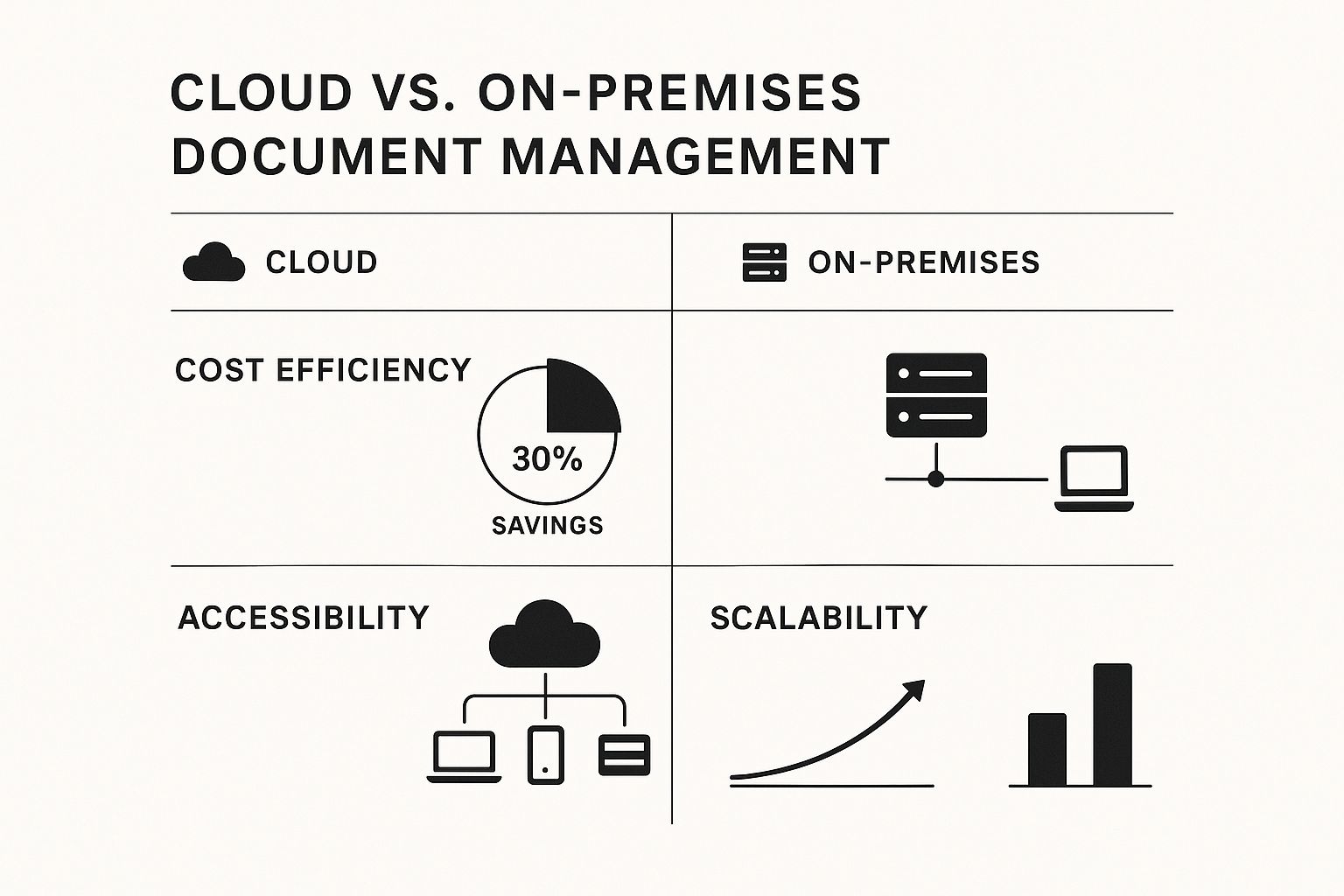
As you can see, cloud solutions offer some serious advantages when it comes to cost, flexibility, and empowering remote teams. They grow with you, not against you. To dig even deeper into this topic, check out this excellent guide on Cloud Based Document Management Systems: Complete Guide & Benefits.
When you centralize how documents are handled, you naturally reduce errors and boost clarity across the entire organization.
On-Premise vs. Cloud Document Management at a Glance
Choosing between an on-premise and a cloud-based system is a major decision. To make it clearer, let's break down the key differences side-by-side.
Feature | On-Premise Document Management | Cloud Document Management Solutions |
|---|---|---|
Accessibility | Limited to the office network; remote access is complex and often slow. | Accessible from anywhere with an internet connection, on any device. |
Initial Cost | High upfront investment in servers, software licenses, and IT staff. | Low initial cost with a predictable monthly or annual subscription fee. |
Maintenance | Your internal IT team is responsible for all updates, security, and upkeep. | The provider handles all maintenance, security patches, and server updates. |
Scalability | Scaling requires purchasing new hardware and can be slow and expensive. | Easily scalable; you can add or remove users and storage on demand. |
Security | Security is entirely dependent on your internal IT resources and expertise. | Managed by experts with enterprise-grade security, compliance, and backups. |
Ultimately, the choice comes down to control versus convenience. While on-premise gives you physical control, the cloud offers flexibility and lower overhead that most modern businesses find hard to pass up.
Essential Features of Modern Document Systems
A great cloud solution isn't just about storing files; it's about solving real-world problems. While many platforms boast a long list of features, a few core capabilities are what truly separate a simple online folder from a powerful document management system. These are the tools that tackle everyday business bottlenecks head-on, saving time, cutting down on errors, and ultimately changing how your team works together.

Let's look past the marketing jargon and see what these features actually do in day-to-day work. Understanding how they function makes it much easier to see the huge impact they can have on both productivity and security.
Unraveling Complexity with Version Control
Picture a team scrambling to finish a major sales proposal. Without good version control, things get messy fast. The project folder quickly becomes a graveyard of confusing file names like Proposal_v2_final_FINAL.docx and Proposal_JSmith_edits.docx. Before you know it, someone has overwritten hours of work, or worse, the team sends an outdated draft to the client.
Version control puts an end to this chaos. It creates a clean, linear history of every single change made to a document, essentially acting as a time machine for your files. If someone makes a mistake, you can jump back to a previous state in a single click, no harm done. It ensures everyone is always working on the most current version, eliminating confusion and preventing costly blunders.
Securing Information with Granular Access Controls
Let's be honest: not every employee needs to see every file. A junior marketer, for example, has no business viewing sensitive financial forecasts or confidential HR contracts. This is where granular access controls are absolutely critical for keeping your data safe.
Instead of an all-or-nothing approach to security, these controls let you get specific. You can define exactly who can view, edit, share, or delete certain documents and folders. You can set up permissions based on departments, job titles, or project teams, ensuring private information stays that way. This is fundamental for meeting compliance standards and stopping accidental data leaks in their tracks.
A robust security framework is non-negotiable. You can set permissions so a team member can view a document for reference but not download or alter it, providing a critical layer of control over your intellectual property.
Finding the Needle in a Digital Haystack
As your digital archive grows, finding one specific piece of information can start to feel impossible, especially if you can't remember the exact file name. This is where advanced search comes in, turning your document repository into a smart, searchable database.
Modern systems use technology like Optical Character Recognition (OCR) to read the text inside scanned documents, images, and PDFs. This means you can search for a specific clause buried in a 100-page contract just by typing in a keyword. This kind of powerful search saves countless hours that would otherwise be wasted manually digging through files.
Automating the Mundane with Workflows
So many business processes are just plain repetitive. Think about approving an invoice: it gets created, sent to a manager for review, passed to accounting for payment, and then filed away. Trying to manage this manually is tedious and full of potential delays when a document gets stuck in someone’s inbox.
Workflow automation is like having a silent partner that handles these routine tasks for you. You can build simple rules that automatically route documents to the right people in the right order. The system can send reminders, track progress, and create a perfect audit trail. To really grasp what's possible, it’s worth exploring some of the top document automation software out there.
This kind of automation frees up your team from mind-numbing administrative work, letting them focus on bigger-picture initiatives that actually grow the business. It’s what transforms a static storage system into a dynamic tool that actively helps you get work done.
How Cloud Solutions Drive Business Growth
Switching to a cloud-based system isn't just a tech upgrade—it's a strategic move that delivers real, measurable results. The true value of a cloud document management solution is its power to reshape your daily operations, tighten up security, and turn your company's information into an engine for growth.

This move tackles some of the most stubborn problems businesses face, from clunky workflows to the ever-rising costs of maintaining old hardware. By taking document management to the cloud, you can unlock a level of speed and flexibility that simply wasn't possible before.
Enhancing Operational Efficiency
One of the first things you'll notice is a huge leap in operational efficiency. In traditional setups, critical information often gets trapped in digital silos—stuck on local hard drives or buried in separate department folders. A cloud system breaks down those walls, creating a single source of truth for everyone who needs it.
This means no more time wasted hunting for misplaced files or, worse, working from an outdated version. When your teams can find exactly what they need in seconds, projects move faster, decisions get sharper, and collaboration just clicks.
Plus, you can automate those tedious, repetitive tasks like routing invoices for approval or chasing down contract signatures. This frees up your people to focus on what really matters: innovation and serving your customers. We cover more on this in our guide on how to improve workplace productivity with smarter systems.
Driving Significant Cost Reductions
The financial argument for the cloud is just as compelling. Old-school, on-premise systems are expensive. You're paying for servers, software licenses, and the IT staff needed to keep it all running. Cloud solutions flip that model, turning a large, upfront capital expense into a predictable monthly operational cost.
Look at the case of Saipem, a global engineering firm. They reported a 30% reduction in operational costs after moving their document management to the cloud. That’s a direct result of ditching physical server maintenance for good.
The savings don't stop at hardware. Think about all the money spent on paper, printing, ink, and physical storage space. Over time, those savings add up, freeing up cash you can put back into growing the business.
Strengthening Security and Collaboration
With teams spread out everywhere, you need rock-solid security and effortless collaboration. They're not just nice-to-haves anymore; they're essential.
Cloud document management platforms are built with enterprise-grade security from the ground up. We're talking end-to-end encryption, multi-factor authentication, and detailed audit trails that log every single action. For most small or medium-sized businesses, this level of security is far beyond what they could build and manage on their own.
At the same time, these systems make it incredibly easy for people to work together. Team members can securely edit and comment on documents in real-time, no matter where they are. This is a game-changer for remote and hybrid teams, keeping everyone in sync and productivity high. The market numbers back this up: valued at $7.68 billion, the document management system market is expected to hit $18.17 billion by 2030, with cloud-based systems driving most of that growth. You can dive deeper into these document management market trends to see what’s fueling this shift.
Choosing the Right Cloud Solution for Your Team
With so many cloud document management solutions out there, picking the right one can feel overwhelming. But it doesn't have to be. By taking a step-by-step approach, you can cut through the noise and find a platform that actually makes life easier for your team.

The secret is to start by looking inward. Before you even glance at a vendor’s website, you need to understand what your business truly needs. A system that’s perfect for a large hospital won't work for a small marketing agency. This initial self-assessment is the single most important step you can take.
Assess Your Unique Business Needs
Don't get distracted by flashy features you'll never touch. Your search should be grounded in the day-to-day reality of how your team works.
Start by asking a few practical questions:
What are our industry's compliance needs? If you're in a regulated field like healthcare (HIPAA) or finance (FINRA), this is non-negotiable. Your system must meet strict security and data protocols.
How big is our team and how do we collaborate? A platform for a five-person startup is fundamentally different from one built for a 500-employee company with global teams. Think about where you are now and where you plan to be in a few years.
What software do we already rely on? A great document management system plays well with others. It should connect seamlessly with the tools you already use every day, like your CRM or project management software.
Writing this down gives you a powerful checklist to quickly filter out vendors that just aren't a good fit.
Key Evaluation Criteria to Consider
Once you know what you need, you can start comparing your options. Using a consistent set of criteria helps you make a true apples-to-apples comparison instead of getting wooed by a slick sales pitch.
Focus your evaluation on these core areas:
Ease of Use: If a system is clunky or confusing, your team won't use it. Period. Look for an intuitive interface that feels natural and requires minimal training.
Security and Compliance: Go beyond the marketing claims. Ask for specific security certifications like SOC 2 or ISO 27001. You should also confirm they use data encryption and offer security features like multi-factor authentication.
Scalability: Your business will grow, and your software needs to keep up. Make sure the platform can handle more documents and users without slowing down or becoming outrageously expensive.
Integration Capabilities: Does it have pre-built connectors for your existing software? If not, ask about its API (Application Programming Interface) to see how you could build your own custom links. You can even see how different tools handle specific file types by checking out our guide on the 10 best tools to chat with PDF documents.
To keep your evaluation organized, a simple checklist can be a lifesaver. It forces you to compare each vendor against the same important metrics, making your final decision much clearer.
Vendor Evaluation Checklist
Evaluation Criteria | Vendor A | Vendor B | Notes |
|---|---|---|---|
User-Friendly Interface | Does it feel intuitive? Could a new hire learn it quickly? | ||
Key Feature #1 (e.g., Version Control) | Does it meet our specific requirement for this feature? | ||
Key Feature #2 (e.g., AI Search) | How effective is it compared to others? | ||
Security Certifications (SOC 2, ISO 27001) | Are they compliant with our industry standards? | ||
Integration with Our CRM | Is there a pre-built connector or a solid API? | ||
Scalability & Pricing Tiers | What will it cost when we double our team size? | ||
Customer Support Quality | What are the reviews like? Is support included? | ||
Mobile App Availability & Functionality | Can our team work effectively from their phones? |
Using a table like this ensures you don't overlook critical details during demos and trials.
Avoiding Common Pitfalls
Even with a solid plan, it's easy to stumble. A classic mistake is picking a system that’s far too complex for your actual needs. More features often mean a steeper learning curve and a bigger price tag.
Another trap is hidden costs. That initial subscription fee might look great, but always ask about extra charges for more storage, additional users, or premium support. A vendor with a transparent, easy-to-understand pricing model is usually a good sign.
Your goal is to find a solution that fits your business like a glove, not one that forces you to change your entire workflow to accommodate its limitations. A thorough evaluation prevents buyer's remorse later on.
Need help sorting through product reviews and feature lists? Make research easier by listening to them. Download Speak4Me free on iOS to get started.
Getting Your New System to Play Nice with Your Old Tools
Let’s be honest: a new piece of software is pretty useless if it doesn't connect with the tools your team already relies on. A cloud document management solution that operates in its own little world just creates another data island, which is exactly the problem we’re trying to fix. The real magic happens when you get everything talking to each other, turning a bunch of separate apps into one smooth, smart system.
Think about it. Your sales team lands a new client in Salesforce. Instead of someone having to manually create a new project folder, an integration could instantly spin one up in your document system, pre-loaded with the right contract templates and access settings. That's what a connected workflow does—it gets rid of the manual grunt work and lets the tech do its job.
Building a Single Source of Truth
The ultimate goal here is to create a single source of truth for your company’s information. When your cloud document system links up with tools like Slack, Microsoft Teams, or your CRM, information can move between them effortlessly. This starts to break down the walls that often separate different departments and their processes.
This kind of connection has a massive impact on daily productivity. People stop wasting time flipping between apps, copying and pasting information, or downloading a file just to re-upload it somewhere else. Instead, they can find and work on documents right from the platform they’re already in. It’s all about bringing the documents to your team, not making them hunt for the documents.
How to Make the Connection: APIs and Connectors
So, how does this all work behind the scenes? You don’t need to be a developer to grasp the two main ways systems connect.
Pre-Built Connectors: Think of these as plug-and-play adapters. Software vendors often provide these for popular tools (like HubSpot, SAP, or QuickBooks) so you can link systems together with just a few clicks. It's by far the easiest and quickest way to get started.
APIs (Application Programming Interfaces): An API is basically a set of rules that lets different software programs talk to one another. If there isn't a pre-built connector for a specific tool you use, your technical team can use the API to build a custom bridge.
Having good integration options means the system can adapt to your unique way of working, rather than forcing your business to change for the software. For a deeper look at making these connections work effectively, check out our guide on document management best practices.
Here's a simple analogy: A pre-built connector is like plugging a standard lamp into a wall outlet—it's designed to just work. An API, on the other hand, is like giving an electrician the schematic to wire that lamp directly into your home's custom lighting control panel. One is for standard hookups, the other is for custom solutions.
The Everyday Wins of a Well-Integrated System
When you get the integrations right, the benefits show up almost immediately. This isn’t just about making things a little more convenient; it’s about getting the most out of your investment.
You’ll start seeing real improvements, such as:
Faster Turnaround: Workflows can be automated. For example, a contract signed in DocuSign can automatically trigger the next step in your onboarding process without anyone lifting a finger.
Fewer Mistakes: When you cut out manual data entry between systems, you dramatically lower the risk of human error. Information stays consistent and accurate across the board.
Better Teamwork: A team discussing a project in Slack can pull up the latest version of a document right in their conversation. Everything—the discussion and the content—stays perfectly in sync.
At the end of the day, smart integration makes every tool you use more powerful. Don’t forget to integrate accessibility into your new, efficient workflow. Download Speak4Me free on iOS to listen to documents and messages from your favorite apps.
What's Next for Document Management Technology?
The world of cloud document management solutions is moving at a breakneck pace, leaving simple file storage in the dust. The next wave of innovation is already here, and it's all about making these systems smarter, more predictive, and incredibly secure. We're not just talking about adding a few new bells and whistles; this is a fundamental shift in how businesses handle their information.
At the core of this change are Artificial Intelligence (AI) and Machine Learning (ML). Think of these technologies as the new engine driving the industry toward what we call intelligent automation. Instead of you manually tagging files and dragging them into folders, future systems will use AI to instantly understand what a document is and what it's for.
The Dawn of Intelligent Automation
Picture this: you upload a stack of invoices. An AI-powered system immediately identifies them, pulls out key details like invoice numbers and due dates, and sends them off for approval—all without a single click from you. This isn't science fiction; it's happening right now, saving companies from endless hours of data entry and preventing costly human errors.
This intelligence also completely changes how we find things. Soon, you won't just search for a keyword. You'll be able to ask your system a plain-English question, like, "Show me all contracts renewing in the next 90 days that are still missing a signature." The system will understand what you mean and give you the exact files you need in seconds.
The ultimate goal is a system that works for you, not the other way around. It won't just hold your documents; it will actively surface insights, flag risks, and help you improve workflows before you even think to ask.
Finding Gold with Advanced Analytics
Beyond making tasks easier, the real future is in tapping into the value hidden inside all our unstructured data. Most of the information a business runs on—emails, reports, customer feedback—isn't sitting neatly in a database. Advanced analytics tools are now being built directly into cloud document platforms to make sense of this massive sea of text.
This lets businesses spot trends, understand customer feelings, and make smarter decisions. For example, a system could scan thousands of customer support tickets to pinpoint the most common product complaints, giving the development team a clear, data-backed priority list.
Locking It Down with Blockchain
As our data becomes more valuable, protecting it becomes more critical than ever. Blockchain technology is stepping up as a game-changer for guaranteeing document integrity. By creating a permanent, unchangeable record of every action taken on a document, blockchain makes it nearly impossible for anyone to tamper with a file without being noticed. This creates a level of trust and transparency that's essential for things like legal contracts, financial records, and intellectual property.
The market is definitely taking notice of these advancements. The global document management system market is projected to skyrocket from $8.32 billion to $24.34 billion, growing at a powerful 16.6% CAGR. The major players are all racing to build these next-generation features. You can explore the full market analysis on Fortune Business Insights to get a deeper look at what's driving this incredible growth.
Stay ahead with tools that make information more accessible. Download Speak4Me free on iOS to experience the future of content consumption.
Frequently Asked Questions
Jumping into the world of cloud document management solutions can feel like a big step, especially if you're used to having everything stored on-site. It's only natural to have a few questions. Let's tackle some of the most common ones that pop up.
Getting these details sorted out is the key to making a confident move and setting your team up for success.
How Secure Is My Data in the Cloud?
This is usually the first question people ask, and it’s a good one. Top-tier cloud providers treat security with the utmost seriousness, often going far beyond what a typical small or medium-sized business could manage on its own. Think of it less like a filing cabinet and more like a digital Fort Knox.
They build security in layers, which usually includes:
End-to-End Encryption: Your files are scrambled into unreadable code the moment they leave your computer and stay that way while stored on the server. Only someone with the right "key" can decipher them.
Multi-Factor Authentication (MFA): This is a simple but powerful security layer. It means that even if someone steals a password, they can't get in without a second piece of proof, like a code sent to your phone.
Compliance with Global Standards: Reputable services are audited against tough international security standards like SOC 2 and ISO 27001. This independent verification is your proof that they follow best practices for protecting data.
Is Migrating to the Cloud Difficult?
The idea of moving an entire company's worth of files sounds intimidating, but it's not the mountain it seems. The complexity really just depends on the volume of data you're moving. The good news is that most vendors have been through this hundreds of times and provide specialized tools and support to guide you.
The smartest way to handle it is with a phased approach. Don't try to move everything over a single weekend. Start with one department or a set of current project files. This lets your team get their feet wet with the new system without disrupting the whole company and makes the entire process feel much more manageable.
Can a Cloud Solution Really Save Money?
Yes, it absolutely can. Most businesses find that switching to the cloud leads to some serious cost savings. You're essentially trading a massive, one-time cash outlay for servers and hardware for a predictable monthly or annual subscription fee.
This shift from a capital expense to an operational one is a game-changer. You no longer have to worry about the costs of buying, maintaining, and eventually replacing bulky on-site servers. Plus, you'll see savings on things like paper, printer ink, and physical storage space, which all adds up.
Have more questions? Get clear answers by listening to articles and guides on the go. Download Speak4Me free on iOS.
Try Speak4Me for Free
