Convert Text to Voice Free with This Simple Guide

Ever find yourself wishing you could just listen to an article or an email instead of reading it? It's actually easier than you might think to convert text to voice free of charge. Thanks to modern AI tools like Speak4Me, you can turn pretty much any written word into natural-sounding audio, right from your phone.
Your Quick Guide to Free Text to Voice
This isn't just a neat trick; it's a game-changer. Imagine listening to articles during your commute, proofreading a report by hearing it read back to you, or just giving your eyes a break. Text-to-speech technology grabs any text you give it—a website, a PDF, an email—and reads it aloud. It's like having a personal narrator in your pocket.
In this guide, we’ll walk you through how to get started. No complicated software or technical know-how needed. We're keeping it simple so you can start listening right away. To experience it for yourself, download Speak4Me free on iOS.
The Rise of Accessible Audio
The demand for this kind of tech has exploded. The global text-to-speech market was recently valued at around USD 4.55 billion, and experts predict it will jump to roughly USD 37.55 billion by 2032. That massive growth is all thanks to huge leaps in AI that have made the voices sound incredibly human.
This isn't just about big numbers, though. It means more people can access information in a way that truly works for them. If you're curious about the nuts and bolts, you can learn more about how to convert text to audio for free.
Text-to-speech isn't just a convenience; it's a powerful tool for productivity and learning. It assists you by transforming reading from a stationary activity into one you can do while commuting, exercising, or multitasking.
Why Use a Free App
So, why start with a free app? For most of us, it’s the perfect way to jump in without any strings attached.
It costs nothing to get started. You can try out all the core features without spending a dime.
You get instant access. Just download the app, and you can be converting your first article in minutes.
They're built for ease. Apps like Speak4Me are designed to be intuitive, so you don't need to be a tech wizard to use them.
Before we get into the details, why not see for yourself? Go ahead and download Speak4Me free on iOS so you can follow along with the next steps.
Getting Started on Your iPhone
Alright, let's get you set up to convert text to voice for free right on your iPhone. The first thing we need to do is grab the right tool for the job. We're going to walk through finding and installing Speak4Me from the App Store, which honestly just takes a couple of taps.
This visual gives you a great idea of how simple the process is—turning your words into audio with a single action.
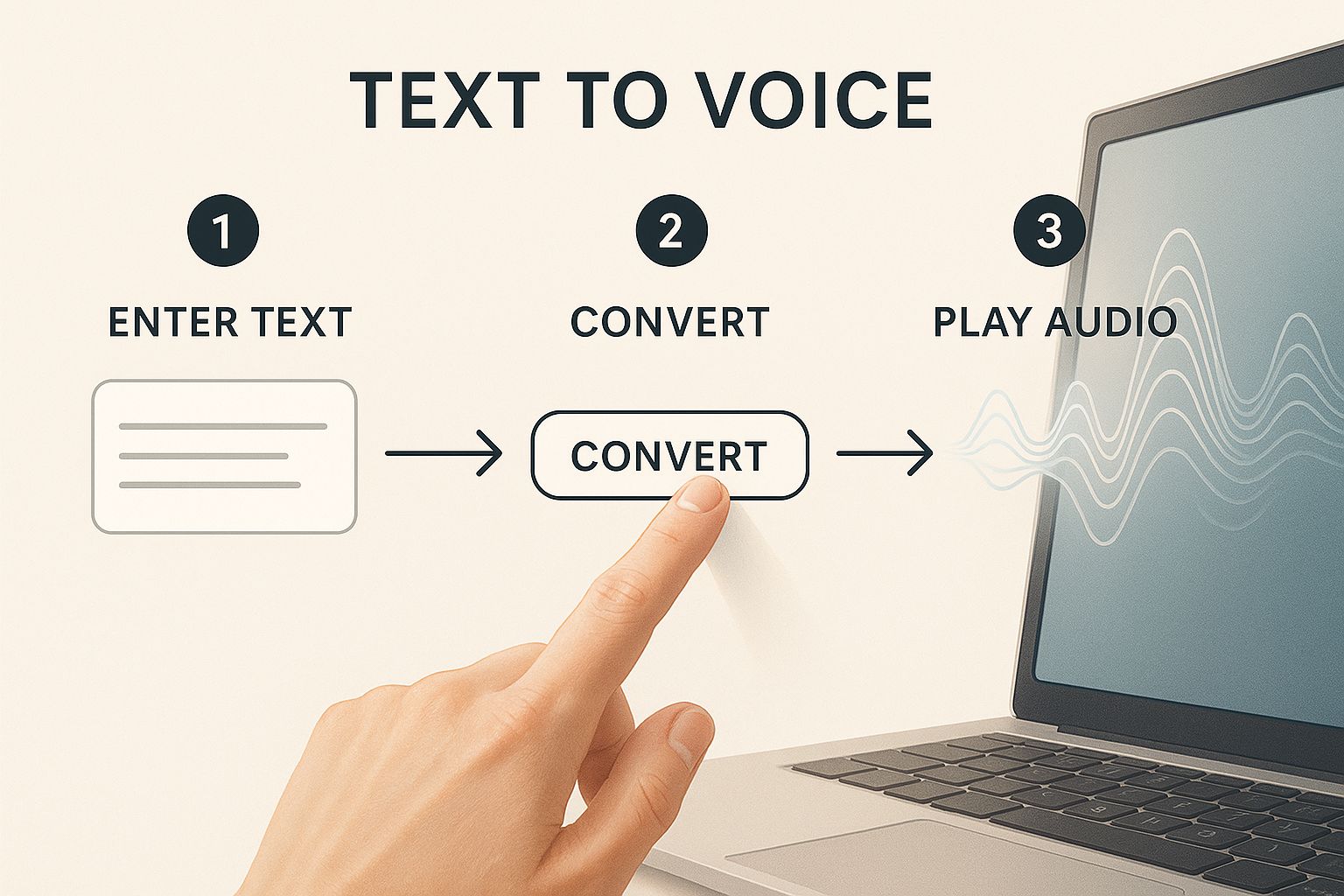
The real magic here is how one tap kicks off the whole conversion, making your text audible in just a few seconds. Once you have it installed, we’ll take a look at the clean, straightforward interface together.
Your First Conversion in Under a Minute
The whole point is to get you from installation to listening to your first audio clip in less than 60 seconds. You don't need to be a tech whiz; the app is built for anyone to pick up and use immediately.
We'll show you exactly where to paste your text, hit the play button, and even browse through the different voice options available. We're skipping all the technical fluff to make sure you feel comfortable from the get-go.
The best tools are the ones that don't get in your way. A good text-to-voice app should feel like a natural part of your process, not another complicated piece of software you have to learn.
So, to get started, just open up the App Store on your iPhone.
Search for "Speak4Me," and this is what you should see on the app page. Notice how clean the layout is—it's designed to make downloading quick and painless. This user-friendly approach really shows how accessible this kind of technology has become.
Ready to try it on your own device? Your next step is easy. Go ahead and download Speak4Me free on iOS from the App Store. Once that's done, you'll be all set for the next section, where we'll turn some actual text into audio.
Turning Your Words into Lifelike Audio
Alright, this is where the magic happens. Let's get into the practical side of turning any text you have into crisp, clear audio. When you need to convert text to voice free of charge, you've got a few fantastic options with Speak4Me that can slide right into your day.
Here are a few real-world ways to use it all the time.
The simplest way to get started? Just type directly into the app. This is a go-to for hearing your own writing read back to you. Whether you're polishing a big work email or just trying to catch typos in a report, hearing it spoken aloud is a game-changer. It’s amazing how many awkward phrases or mistakes your ears will catch when your eyes just skim over them.
Another great trick is the classic copy-and-paste. See a long-form article you've been meaning to get to? Instead of letting it sit in an open tab forever, just copy the text, pop open Speak4Me, and paste it. Boom. Now you can listen to the whole thing while you’re making dinner or hitting the gym.
Making It Effortless with Other Apps
For true efficiency, a favorite method is using the 'Share' feature right from another app on your iPhone. This little trick means you don't even have to bother with switching apps.
From your browser: Stumble upon a great blog post? Just tap the share icon in Safari or Chrome and pick Speak4Me from the menu. The app grabs the text for you instantly.
From your email: Got a massive email from your boss? Share it directly to the app and listen while you grab a coffee.
From your notes: This works with study notes all the time. Sending them over to be read aloud is perfect for hands-free review before a test.
This kind of built-in functionality is all about saving you clicks and saving you time. If you're curious about the tech that makes it sound so human, you can learn more about creating natural sounding text to speech on our blog.
The whole point is to make listening to text feel as natural as putting on a podcast. It should just work, so you can focus on the content, not the tool.
It's no surprise that the global text-to-speech market is expected to hit between USD 3.71 billion and USD 4.66 billion. Cloud-based apps are at the forefront of this growth, and millions are using free tools like Speak4Me for high-quality audio without needing fancy equipment. You can dig into the growth of the TTS market here if you want to see the numbers.
Ready to give it a shot? Download Speak4Me free on iOS and see just how easy it is to turn your reading list into a listening list.
Fine-Tuning Your Audio Experience
Let's be honest, a monotone, robotic voice just doesn't cut it. When you want to convert text to voice free for your own use, the experience has to feel right. The best audio is tailored to you, which is why dialing in the settings on Speak4Me makes such a big difference.
Think about it—when you’re listening to a podcast, the host's voice and delivery are key to keeping you hooked. You get that same level of control here.
For example, you can use the app to get through dense research papers. By slowing the reading speed way down, you can actually absorb the complex details without having to constantly rewind. But when you’re just catching up on your morning newsletters, you can crank the speed up to fly through them. It’s a simple tweak that completely changes how you consume written content.
Getting the Voice Just Right
The speed is only half the battle. The actual voice you're listening to is just as important for comfort. Speak4Me gives you a whole library of different voices and languages to experiment with. You can also play around with the pitch to find a tone that's easy on the ears.
This isn't just about preference; it's about making the entire listening session more effective. We've put together a full walkthrough on this, which you can find in our guide on how to change voices in the app.
A personalized listening experience is more than a luxury; it’s a tool that supports better focus and comprehension. By tailoring the voice, speed, and pitch, you create an environment where information is easier to process and retain.
Once you’ve generated audio that sounds perfect, you might even get curious about what else is possible. For anyone diving into audio production, learning how to mix vocals for a professional sound is a great next step that offers a fascinating look into what makes audio truly high-quality.
Ready to find your perfect settings? Download Speak4Me free on iOS and start experimenting.
So, How Can You Actually Use These Tools?
It’s easy to think of a text-to-voice app as just a neat trick, but where does it really fit into your daily life? The answer is… pretty much everywhere.
For students, this is a total game-changer. Imagine being able to listen to your lecture notes while you’re at the gym or on the bus. It transforms dead time into productive study sessions.
If you're a professional, think of it as your secret proofreading weapon. You know how you can read the same email five times and still miss a glaring typo? Hearing your words read back to you makes those awkward sentences and mistakes jump right out. It's a simple, powerful way to add that final layer of polish.
Content creators can get in on this, too. Before spending hours in a recording booth, you can generate a quick audio version of your script. This lets you check the timing and flow of a video, ensuring everything sounds natural before you even hit record.
More Than Just a Productivity Hack
Beyond getting work done, text-to-voice supports accessibility. For anyone who struggles with reading, these tools open up a world of written content by providing an auditory alternative. It’s a key part of making digital spaces more inclusive for everyone. In fact, this is such a big deal that accessibility laws like Section 508 in the US are pushing this technology forward. You can even read more about the text-to-speech market's growth to see how it's expanding.
A simple app like Speak4Me can quickly become one of your most-used tools for learning, working, and just making life easier—all from your phone.
And let's not forget the fun stuff. It’s a fantastic way to turn any written story into your own personal audiobook. You can take an article or a short story and listen to it while you're cooking dinner or winding down for the night. Think of it like creating your own custom playlist of adult bedtime stories read aloud without having to stare at a screen.
Whether it’s for work, school, or just for kicks, the right tool can solve a surprising number of everyday problems. The best way to see how it fits into your life is to give it a try. Download Speak4Me free on iOS and see what you can do with it.
Got Questions? We've Got Answers
Jumping into a new app always sparks a few questions. Let's clear up some of the most common ones so you can get started with confidence.
Is It Really Free to Turn Text into Speech?
Yes, it really is. An app like Speak4Me gives you all its core text-to-speech features without asking for a penny. It's perfect for everyday things, like having an article read aloud while you're driving or getting the app to proofread an important email back to you.
There are no hidden costs to get started. Just download the app and you can begin converting text to audio right away. The goal is to make this kind of tool available to anyone who could benefit from it.
How Good Do the AI Voices Actually Sound?
Honestly, they've come a long, long way. Forget those old, robotic computer voices from a decade ago. Today's AI voices are surprisingly clear and natural-sounding, making them easy to listen to for more than just a few minutes.
The only way to really know is to hear it for yourself. The quality is fantastic for just about anything—from a quick text message to a full chapter of a book. It's a genuinely smooth listening experience.
Plus, you can usually play around with different voices and tweak the speed or pitch. This lets you find a voice that sounds best to you and customize it for your own listening comfort.
Can I Use the Audio for My Own Projects?
That’s a smart question. For all your personal stuff—like studying, catching up on work documents, or just listening to news articles—you're good to go. It’s an incredible tool for making your daily routine more productive and accessible.
However, if you're thinking of using the audio for something public or commercial, like a YouTube video or a podcast, you'll need to check the app's terms of use. Speak4Me is built primarily for personal productivity, learning, and accessibility.
Ready to give your eyes a break? Speak4Me makes it incredibly easy. Download Speak4Me for free on iOS and start turning your text into audio in minutes.
Try Speak4Me for Free
