How to Reduce Screen Time and Win Back Your Day

If you're serious about cutting down your screen time, the first step is a bit of honest detective work. You have to figure out where your time is actually going. For one full week, your only job is to observe your digital habits without judgment. The goal is to get a clear picture of which apps are the biggest time sinks and what situations trigger you to start scrolling.
Find Out Where Your Digital Time Really Goes
Most of us are completely off when we guess how much time we spend on our phones. We think it's an hour here or there, but the reality is often shocking. This isn't about shaming yourself; it's about moving from mindless, automatic scrolling to using your devices with a real purpose. You can't solve a problem until you truly understand it.
The numbers don't lie. Globally, average daily screen time is expected to hit 6 hours and 40 minutes by 2025. That's a huge leap from the 6 hours and 9 minutes a day back in 2013. The pandemic certainly didn't help, tacking on an extra 16 minutes to our daily average as everything from work meetings to happy hours moved online.
Use Your Phone’s Built-In Tools
The good news is, your phone already has everything you need to start this audit. No extra downloads required.
On an iPhone: Just head to
Settings > Screen Time. You’ll get a super detailed report of your daily and weekly use, showing your most-used apps and even how many times you picked up your phone.On an Android: Look for
Settings > Digital Wellbeing & parental controls. This dashboard gives you the same kind of powerful insights, breaking down your usage app by app.
Check in with these reports for a few minutes each day. You'll start to see patterns emerge pretty quickly. Maybe you're losing two hours to Instagram after dinner or doomscrolling the news for 30 minutes before your feet even hit the floor in the morning. That’s the kind of data you can work with.
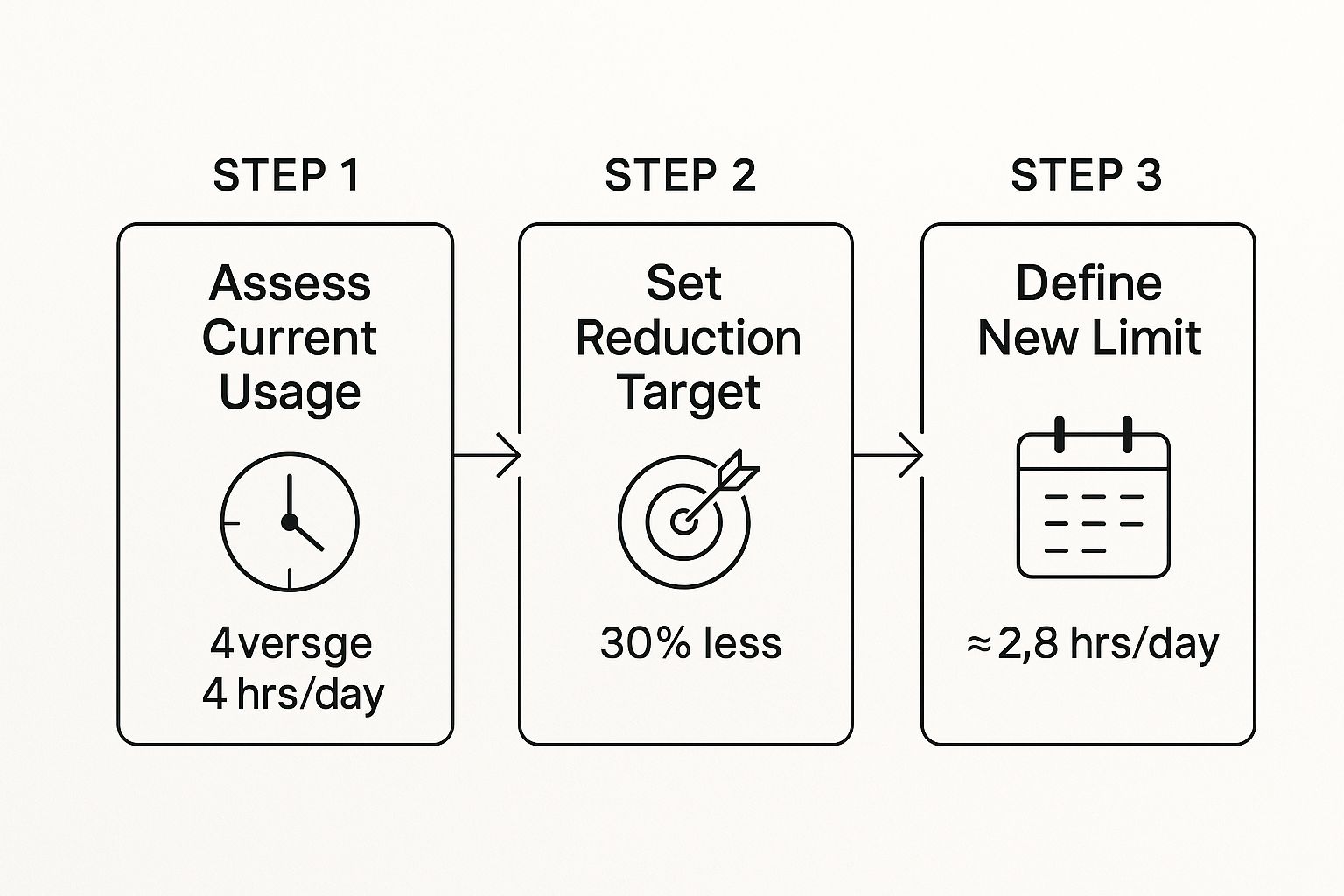
As you can see, once you assess where your time is going, you can set a realistic goal and create a new daily limit that actually works for you.
Identify Your Personal Triggers
Knowing which apps you use is only half the story. The real key is understanding why you open them in the first place. Are you bored? Stressed? Avoiding a big project? Or is it just a deeply ingrained habit, like checking your phone at every red light?
Pay attention to what’s happening right before you reach for your device. This awareness is fundamental to breaking the cycle and learning how to be more productive with your time.
To get started, try mapping out your habits with a simple chart.
Your Personal Digital Habit Audit
Use this simple framework to map out your screen time patterns and triggers.
Time of Day | App or Device | What I Was Doing | What Triggered Me | How I Felt After |
|---|---|---|---|---|
8:00 AM | Scrolling in bed | Woke up, habit | Groggy, rushed | |
3:15 PM | News App | At my desk | Procrastinating | Anxious, unfocused |
9:30 PM | YouTube | On the couch | Boredom | Tired, overstimulated |
Jotting this down for a few days can reveal so much. You'll quickly see the connection between your emotional state and your digital consumption.
By understanding the emotional or situational cues that lead to mindless scrolling, you can begin to address the root cause of excessive screen time instead of just treating the symptom.
Ultimately, the goal is to make your screen time a conscious choice. One of the best ways to do this is to switch from watching to listening. Instead of staring at an article or document, let Speak4Me read it to you. You can Download Speak4Me free on iOS and start turning all that text into audio, freeing up your eyes and your hands.
Make Your Phone Work for You, Not Against You
Your phone was designed to be irresistible. Every color, sound, and notification is crafted to grab your attention and keep you scrolling. But you can fight back. A few deliberate tweaks to your phone's settings can turn it from a constant distraction into a tool you control.
It starts with the notifications. That endless stream of pings and buzzes is no accident; it's a feature designed to pull you back in. The solution is to be ruthless. Go into your settings and silence everything that isn't a time-sensitive alert or a message from an actual person. You'll be amazed at the peace and quiet.
Tidy Up Your Home Screen
Think of your phone's home screen as your digital front door. If it's cluttered with tempting, time-wasting apps, you’re far more likely to open them without a second thought.
Banish the bad stuff. Shove your social media, news, and gaming apps into a folder and move it off the main screen. That tiny bit of friction—having to swipe and tap into a folder—gives you a moment to ask yourself, "Do I really need to open this right now?"
Organize like a toolbox. Instead of grouping apps randomly, create folders for specific tasks: "Money," "Travel," "Work," etc. This simple shift in organization reinforces the idea that your phone is a utility, not just an entertainment device.
Getting those distracting icons out of your immediate view makes a huge difference. Out of sight, out of mind really works. If you want to take your digital organization to the next level, check out some of the best productivity apps that can help you get even more streamlined.
Redesigning your digital space to be less stimulating is one of the most effective ways to break the habit of mindlessly picking up your phone. You're removing the triggers that lead to wasted time.
Turn Down the Visual Noise
App designers know that bright colors trigger our brains. That little red dot on an app icon creates a sense of urgency that's hard to ignore. Luckily, there's a simple way to neutralize this psychological trick.
Switch your display to grayscale. It’s a simple change in your accessibility settings, but the effect is profound. Suddenly, Instagram isn't a vibrant world of beautiful photos; it's just a dull, gray feed. This one change can single-handedly drain the addictive quality from your most-used apps.
Create and Enforce Digital Rules
Your phone comes with built-in tools to help you set firm limits. You just have to use them. Dive into your settings and set up app timers for the apps you know you overuse. Give yourself 30 minutes a day on TikTok, and when the time’s up, the phone will lock you out. It’s a non-negotiable reminder to stick to your goals.
You can also schedule downtime or use "Focus Modes." These features automatically block notifications and limit app access during specific times, like your work hours or the hour before you go to sleep. It takes the willpower out of the equation and lets the phone enforce the boundaries for you.
The digital world is built to keep us passively engaged. Social media use is projected to climb to 2 hours and 41 minutes per day by 2025, thanks in large part to addictive, algorithm-driven video feeds. You can read more about these screen time trends and see just what we're up against.
Of course, you still need to get through articles, emails, and documents. Instead of adding more screen time to your day, try listening. Download Speak4Me free on iOS and let it read your content to you. You can catch up on your reading list while you’re walking the dog or doing chores, giving your eyes a much-needed break from the screen.
Create New Routines Without Screens
Cutting back on screen time is less about stopping a bad habit and more about starting a few good ones. If you don't have something to fill the void your phone leaves behind, you'll inevitably find yourself scrolling again. The real secret to making these changes last is building practical, screen-free routines into your day.
It all starts with being intentional. You have to schedule your offline time just like you would a meeting. Research shows that setting aside specific "digital detox" periods can slash your daily screen time and even improve focus and sleep. You can dig into some of the digital wellness findings yourself to see just how much of a difference structured breaks can make.
At the end of the day, it's about swapping out old digital habits for new, more fulfilling offline alternatives.
Implement a Digital Sunset
One of the most effective routines is the "digital sunset." It’s simple: put away all your devices—phone, tablet, laptop—at least one hour before bed. The blue light from screens messes with melatonin, the hormone that tells your body it's time to sleep, and it can seriously disrupt your natural rest cycle.
Instead of doomscrolling or firing off one last email, use that final hour to actually wind down.
Read a real book. There's something calming about turning physical pages that a screen just can't replicate.
Listen to a podcast or audiobook. You can still take in great content without staring at a bright light.
Try some light stretching or journaling. These are great ways to help your mind and body disconnect and prepare for a good night's sleep.
By drawing a clear line between your active day and your rest time, you're giving your brain the signal it needs to switch off, leading to much deeper, more restorative sleep.
Redesign Your Morning Routine
How you begin your day often dictates how the rest of it will go. If grabbing your phone is the very first thing you do, you're immediately letting a flood of notifications, news alerts, and other people's priorities hijack your brain. It's a reactive way to start, and it can leave you feeling stressed before you've even had a sip of coffee.
Give this a try: go completely screen-free for the first 30 to 60 minutes of your day. That small window of quiet allows you to start the morning on your own terms, with intention instead of distraction.
Instead of immediately checking your phone, try one of these simple swaps.
Sometimes, all it takes is a simple switch to break the cycle of endless scrolling. Here are a few practical, screen-free swaps for common digital habits that can help you reclaim your time and attention.
Simple Screen-Free Activity Swaps
Instead of This Digital Habit... | Try This Offline Alternative... |
|---|---|
Mindlessly scrolling social media | Pick up a book, magazine, or do a puzzle |
Watching TV or streaming videos | Go for a short walk or do some light stretching |
Browsing news apps in the morning | Listen to a daily news podcast while making breakfast |
Texting friends to catch up | Give them a quick phone call instead |
Playing a game on your phone | Play a card game, a board game, or do a crossword |
By consciously choosing an offline activity, you're not just reducing screen time—you're actively engaging with the world around you in a more meaningful way.
When you do need to get caught up on news or longer emails, you don’t have to sacrifice your screen-free start. An audio tool can be a game-changer here. You can Download Speak4Me free on iOS to have articles and documents read aloud while you get ready. This lets you stay informed without getting sucked into your screen first thing. It's a simple change that can make your mornings feel a whole lot calmer.
Rediscover Fun and Fulfilling Offline Hobbies

Let's be honest. Half the time we grab our phones, it's just because we're bored. That quiet moment between meetings or the lull after dinner can feel like a void, and our screens are the quickest, easiest way to fill it.
The real secret to cutting back on screen time for good is having compelling offline activities ready to jump into. It’s about building a life away from the screen that’s so engaging, your phone starts to feel a little less essential.
Find a Hobby That Clicks With You
This isn't about forcing yourself to knit if you hate it. It's about finding something that genuinely pulls you in. A great way to start is by thinking about what kind of person you are.
For the Creative Mind: If you love making things, this is your zone. You could try painting, finally learning that guitar, or taking up a simple craft. Many creative hobbies are easier to get into than you think. For example, if you're curious about textile arts, you might be surprised to find out is cross stitch easy to learn.
For the Active Body: Getting up and moving is one of the best ways to counteract a life spent sitting and scrolling. This could be as simple as joining a local hiking group, starting a small container garden, or signing up for a dance class you've always wanted to try.
For the Social Butterfly: If you’re energized by other people, look for group activities. Think about a book club, a casual sports league, or volunteering for a cause you care about. You get that social connection without a screen acting as the middleman.
Have you ever scrolled through social media out of boredom, only to feel even more bored afterward? Researchers have a name for that: "boredom in, boredom out." A hobby you actually enjoy breaks that cycle by giving you a real sense of accomplishment.
The push for less screen time isn't just a personal goal anymore; it's becoming a public health conversation. Sweden, for example, brought new guidelines into its schools to limit screen exposure and encourage outdoor play. The result? Some districts saw a 20% drop in students' daily screen time.
That first moment you put your phone down can feel a little weird. Pushing past that "what do I do now?" feeling is the hardest part.
My advice? Start small. Commit to just 15 minutes of your new hobby each day. Before you know it, that offline time will become something you genuinely look forward to. And for those times you want to dive into an article or guide about your new passion, you can still give your eyes a break. Download Speak4Me free on iOS to listen to content and stay inspired without adding to your screen time.
Use Audio to Stay Informed and Cut Down on Eye Strain

Learning how to spend less time on your phone doesn't mean you have to be out of the loop. Let's face it, a huge chunk of our screen time comes from reading—news articles, work documents, long emails, and those blog posts you save for later. The problem is, all that reading keeps your eyes glued to a screen.
This is where audio tools can be a total game-changer. By turning written text into spoken words, you can still get through all your content while giving your eyes a much-needed break. Speak4Me helps you do exactly that.
Turn Your Reading List into a Personal Playlist
Think about it: what if you could get through your morning news roundup on your commute, listen to a detailed report while making dinner, or catch up on work docs while walking the dog? That’s exactly what text-to-speech (TTS) technology lets you do. Speak4Me turns any article or document into your own personal podcast.
This simple switch has a couple of big wins:
It slashes passive screen time. You’re still getting all the information you need, just without the constant scrolling and staring.
It lets you multitask smartly. You can pair listening with other things like exercising, cleaning, or driving, which is a fantastic way to win back some time in your day.
Even with the best intentions, you might still feel the effects of digital eye strain. If you're looking for professional advice, you can find proven relief with a Digital Eye Strain Treatment.
Shifting from reading to listening engages your brain differently. It can actually boost your focus and help you remember more, much like the proven benefits of audiobooks. It’s a powerful move for both learning and just getting things done.
Model Healthier Habits for Everyone
Building smarter screen habits isn't just for us. It’s pretty startling to learn that nearly 50% of toddlers between 0 and 2 have used a smartphone. This kind of early exposure really underscores why it’s so important for adults to model healthier ways of consuming information. When you choose to listen instead of scroll, you’re showing that staying informed doesn't always have to involve a screen.
An app like Speak4Me can become your personal reader, turning that pile of articles into an easy-to-listen-to audio stream. It’s a simple, effective way to get back your time and focus without feeling like you're missing out. Ready to give it a try? Download Speak4Me free on iOS.
Got Questions About Cutting Screen Time?
As you start to unplug a little more, you're bound to have questions pop up. That's totally normal. Knowing what to expect and how to handle common roadblocks is a huge part of building healthier tech habits that actually stick. Let's dig into some of the things people often ask when they're on this journey.
So, How Much Screen Time Is Actually Too Much?
Honestly, there’s no universal magic number here. You'll see guidelines thrown around, but the real question to ask yourself is: How does my screen time make me feel?
Think about it. Do you feel drained after scrolling, or energized? Do your devices help you feel more connected to people, or more isolated? Are you getting things done, or just getting distracted?
Instead of fixating on a number in your weekly screen time report, focus on how it impacts your life. If your phone is getting in the way of good sleep, real-life relationships, or your mental health, then it's too much for you. The goal is to use your devices with intention, not just to hit a lower number.
What’s the Best Way to Get Started?
Jumping in can feel like a lot, but you don't have to do everything at once. A few simple tweaks can make a massive difference right away.
Here’s a practical game plan to kick things off:
Do a quick audit. Just for one week, use your phone's built-in tools (Screen Time on iOS or Digital Wellbeing on Android) to see where your time is really going. No judgment, just data. You might be surprised.
Give your home screen a makeover. This is a game-changer. Drag all those tempting social media and entertainment apps off your main screen and tuck them away in a folder. That little bit of extra effort to open them gives your brain a second to ask, "Do I really need to do this right now?"
Establish a "digital sunset." Make a commitment to put all screens away at least one hour before bed. Use that time for something analog—read a book, stretch, listen to a podcast, or just chat with someone.
These three steps are powerful because they build awareness, add a little healthy friction, and protect your rest. It's a solid foundation for everything else.
But What if My Job Is All Screens, All Day?
This is a big one. For so many of us, being glued to a screen is just part of the job description. The goal here isn’t to ditch your computer—it’s to be smarter about how you use it.
Try the Pomodoro Technique: work in a super-focused 25-minute burst, then take a 5-minute break completely away from your screen. Seriously, get up, walk around, look out a window. It does wonders for eye strain and mental fatigue.
Another fantastic strategy is to lean on audio tools for long documents, reports, or lengthy emails. Instead of staring at a wall of text, have Speak4Me read it aloud to you. You're still getting the information, but you're giving your eyes a much-needed rest.
I've found that a good text-to-audio app like Speak4Me is an absolute lifesaver for professionals. It lets you "read" reports during your commute or while making lunch, untethering your productivity from your screen time.
By shifting some of your work from reading to listening, you can stay on top of your tasks without feeling completely zapped by the end of the day.
Ready to listen more and scroll less? With Speak4Me, you can turn any article, PDF, or document into clear audio, helping you stay informed while reducing eye strain and freeing up your hands. It's a simple, powerful tool to support your journey toward a healthier digital life.
Download Speak4Me free on iOS and start transforming your reading list into your listening list today.
Try Speak4Me for Free
