How to Stay Organized at Work and Be Productive
Being organized at work isn't just about having a neat desk. It’s about building a solid system to manage your physical space, your digital world, and—most importantly—your time. This means decluttering your workspace, setting up a smart digital filing system, and finding a time management rhythm that lets you be proactive instead of constantly reacting.
A clean environment and a clear plan are truly the cornerstones of getting things done.
Tame Your Workspace for Ultimate Focus
Let's be honest: a messy desk usually means a distracted mind. It's often the first thing that gets in the way of a productive day. So, creating a physical and digital environment that's built for focus is step one. The goal is to design a space that works for you, not against you.
You can start small. Beyond just tidying up, learning how to keep your desk clutter-free and be more productive is a game-changer for deep work. One simple trick I love is the "touch it once" rule. When a document or email comes your way, deal with it right then and there. Act on it, file it, or trash it. No more piles of "I'll get to it later."
It's tough to stay organized and engaged, especially with so many of us working in hybrid setups. In fact, globally, only about 21% of workers felt engaged at work in 2024. Interestingly, companies that are using AI are seeing a 72% improvement in productivity and a 59% bump in job satisfaction, which shows how the right tools can really help.
Establish Clear Zones and Routines
To keep that sense of order, try creating dedicated "zones" for different types of tasks. This little habit makes it so much easier to switch between projects without losing your train of thought. For example, you could have one spot just for your current project files, another for reference books, and a third for all your office supplies.
A well-organized space reduces cognitive load, freeing up your mental energy for the complex challenges that matter most. It's not about being perfectly neat; it's about making your workflow smoother.
To make sure your new, organized space stays that way, you need a few simple routines. Give these a try:
The 5-Minute Tidy: Before you sign off for the day, spend the last five minutes clearing your desk. File away papers, wipe things down, and get your to-do list ready for tomorrow. Waking up to a clean slate is an amazing feeling.
The Weekly Reset: Block out 30 minutes on a Friday afternoon. Use this time to organize your computer's desktop, empty your downloads folder, and archive files from any projects you've wrapped up.
Of course, a system is only as good as your ability to stick with it. When an idea pops into your head, you need a way to capture it without adding to the clutter. A hands-free tool can be a lifesaver here. With just a voice command, you can save a note or set a reminder, all while keeping your hands on the keyboard and your focus locked in. Speak4Me assists with this by turning your voice into text.
To bring it all together, think of your workspace organization as having four core pillars. Each one supports the others, creating a strong foundation for productivity.
The Four Pillars of an Organized Workspace
Pillar | Action Step | Primary Benefit |
|---|---|---|
Physical Declutter | Apply the "touch it once" rule and establish zones. | Reduces distractions and mental clutter. |
Digital Organization | Create a logical folder structure and do a weekly reset. | Saves time finding files and prevents digital chaos. |
Routine Maintenance | Implement a 5-minute end-of-day tidy. | Prevents clutter from building up over time. |
Efficient Capture | Use a hands-free tool to quickly record ideas. | Keeps you in the flow without interrupting your work. |
Building these pillars into your daily and weekly habits doesn't just make your desk look better; it fundamentally changes how you approach your work, giving you more clarity and control.
Conquer Your Digital Clutter for Good
Let's be honest: digital chaos can be more draining than a physically messy desk. The endless stream of emails, files scattered across a dozen folders, and a browser with way too many tabs open—it all creates a low-level hum of stress that shatters your focus. Getting a real handle on your digital world is one of the most important things you can do to feel organized and in control at work.
The good news? You don't need some overly complex, rigid system. It’s the simple, consistent habits that really move the needle, clearing out the mental fog so you can actually concentrate on what matters.
Rein In Your Inbox
First things first, your email inbox is not a to-do list. If you treat it like one, you’re setting yourself up for failure. A great rule of thumb is to touch each email only once. Decide its fate right then and there: reply, archive, delete, or move it to a specific task folder. To really get this down, check out these practical 8 best ways to organize email.
A simple folder structure can work wonders. I've found a few key folders make all the difference:
Action Required: This is for anything that needs a specific response or task from you. It's your immediate priority list.
Waiting On: Perfect for emails where you’ve delegated something or are waiting for a reply before you can move forward.
Project Files: I create sub-folders here for each major project. It keeps all related communication in one place.
Read Later: For those newsletters, articles, and non-urgent updates you want to get to eventually.
Take 15 minutes to set up some rules or filters. For example, you can create a rule that automatically sends all notifications from your project management tool directly into the right project folder. This alone will save you hundreds of clicks over time and keep your main inbox reserved for actual human communication.
Create a Logical File System
Nothing wastes time like searching for a document you know exists but can't find. We’ve all been there, scrolling through files named "Final_Draft_v2_final_final." A consistent naming convention is your best friend here.
A simple but incredibly effective format is YYYY-MM-DD_ProjectName_DocumentType_Version. For instance, a file named 2024-10-26_Q4-Report_Draft_v1 tells you everything you need to know at a glance and sorts perfectly. To build a system that works for your team, it's worth reviewing some core document management best practices.
The point of getting digitally organized isn't just about finding stuff faster. It's about lowering the mental energy it takes to manage all your information. That frees up your brainpower for the creative, high-impact work you were actually hired to do.
Of course, great ideas and urgent to-dos rarely wait for you to be at your desk. Instead of cluttering your own inbox by emailing yourself reminders, you can capture them in the moment. Speak4Me can assist by letting you dictate quick notes and tasks with your voice, which turns a passing thought into an organized text entry without missing a beat.
This way, you can document ideas without breaking your stride or even opening another app. Ready to turn your thoughts into organized action? Download Speak4Me free on iOS.
Design a Time Management System That Works for You
A clean desk is nice, but true organization is really about smart time management. Let's be honest, the generic advice you hear everywhere rarely sticks. The goal is to build a system that actually fits your personal workflow and the unique demands of your job.
That's tougher than it sounds. In today's workplace, the average person is interrupted every three minutes. What’s worse, it can take over 23 minutes to get back on track after a distraction. That constant stop-and-start makes a solid time management strategy non-negotiable if you want to stay organized. If you're looking for more ways to get ahead, you can explore our detailed guide on improving workplace productivity.
Find Your Framework
There's no magic bullet here; it’s all about finding a method that resonates with you. Here are three popular approaches I’ve seen work wonders for different people.
The Pomodoro Technique: This one is simple. You work in focused 25-minute bursts, then take a five-minute break. After four of these sessions (or "pomodoros"), you take a longer break. It’s brilliant for chipping away at big, overwhelming projects and keeping your energy from flagging.
Time Blocking: A favorite of seriously productive people, this is where you schedule your entire day on your calendar. I mean everything—from deep work on a report to checking emails and even taking a lunch break. It shifts you from being reactive to being proactive, making sure your top priorities get the time they deserve.
The Eisenhower Matrix: This is less of a daily schedule and more of a mental filter. It helps you sort tasks by what's urgent versus what's important. You'll categorize everything into four boxes: Do, Decide, Delegate, or Delete. It's a fantastic way to get clarity on what really needs your attention right now.
The infographic below breaks down the time blocking process into three straightforward steps.
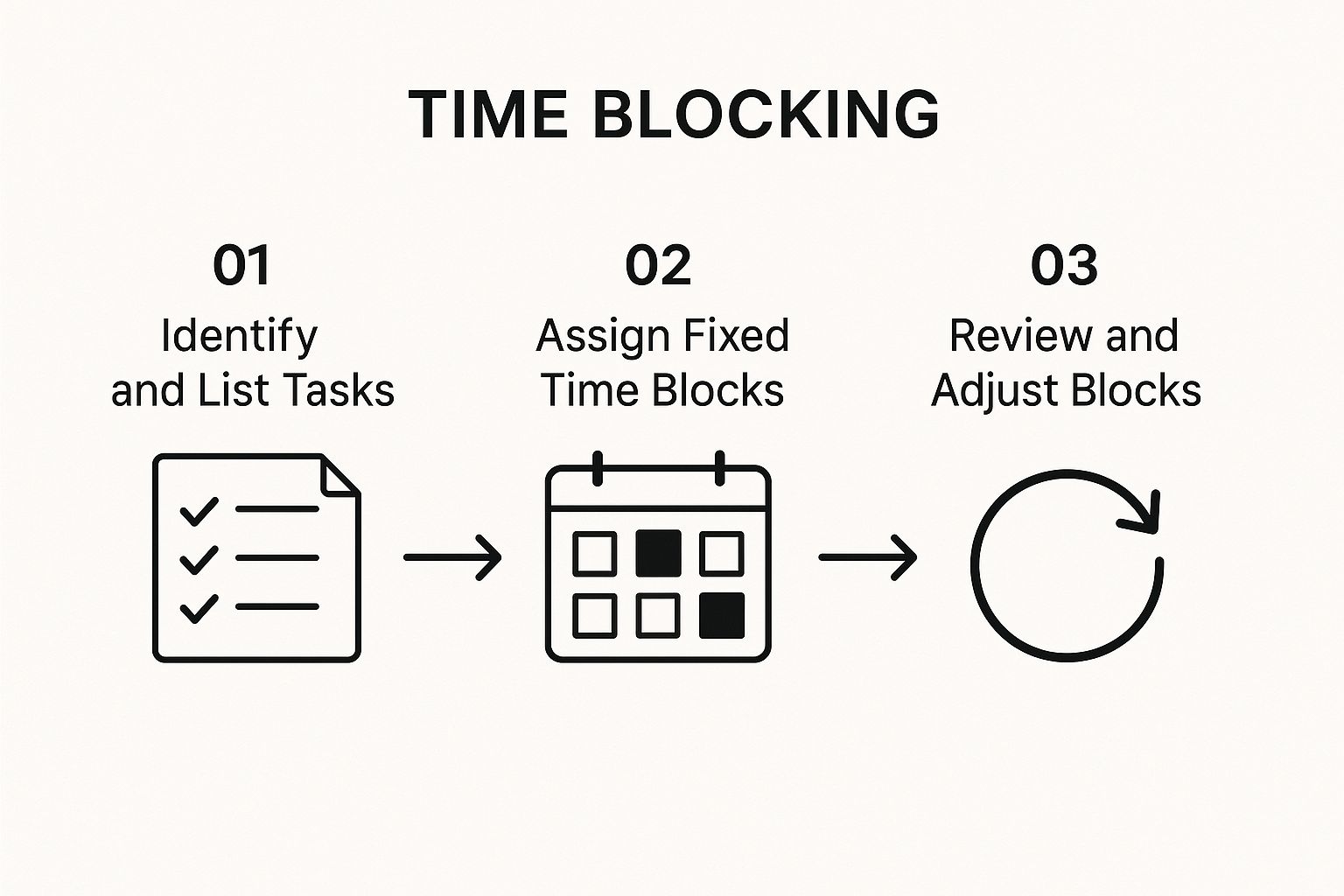
As you can see, it all starts with listing your tasks, then slotting them into your calendar, and finally, being ready to adjust your plan as the day unfolds.
Prioritize Ruthlessly
Once you have a framework, you need to decide what to put in it. This is where the Eisenhower Matrix really shines because it forces you to separate the genuinely important work from the "urgent" noise that constantly vies for your attention.
The goal here isn't just to be busy; it's to protect your most valuable resource: your focus. When you set clear daily goals and fiercely guard your time for deep work, you can handle unexpected tasks without letting your whole day go off the rails.
One of the biggest focus-killers? Capturing new ideas or to-dos without breaking your stride. You’re deep in concentration, and suddenly you remember you need to email someone. Stopping to jot it down can completely shatter your flow.
This is where a simple voice tool can make a huge difference.
With an app like Speak4Me, you can capture tasks and reminders just by saying them out loud. You log the item without ever taking your hands off the keyboard, allowing you to get right back to what you were doing. It's a small change that helps you stay in the zone while making sure nothing gets forgotten.
Let Technology Do the Heavy Lifting
When it comes to staying organized at work, technology can be your best friend or your worst enemy. On one hand, the right tools can bring a beautiful sense of order to the chaos. On the other, the wrong ones just add more digital clutter to your day.
The secret isn't to download every shiny new app. It's about intentionally building a small, powerful "tech stack" where every tool has a specific job and plays nicely with the others.
Think of it like a chef's kitchen. You have your favorite knife for chopping, a specific pan for searing, and a go-to whisk. You don't use a cleaver to peel a grape. The same principle applies here—you need the right digital tool for the task at hand, whether that's managing projects, capturing ideas, or blocking out your time.
Assembling Your Personal Tech Stack
A great tech stack isn't about finding that one mythical, do-it-all app. It's about picking a few specialized tools that work together seamlessly to support how you actually work. Most people I know find that a solid foundation rests on three key pillars.
Task Managers: This is your command center. I always look for ones that let me set recurring tasks, use different priority levels (like flags or colors), and add detailed notes or sub-tasks.
Note-Taking Apps: Think of this as your external brain. The killer features here are powerful search and flexibility. You need a place where you can dump ideas, meeting notes, and web clippings and know you can find them again in seconds.
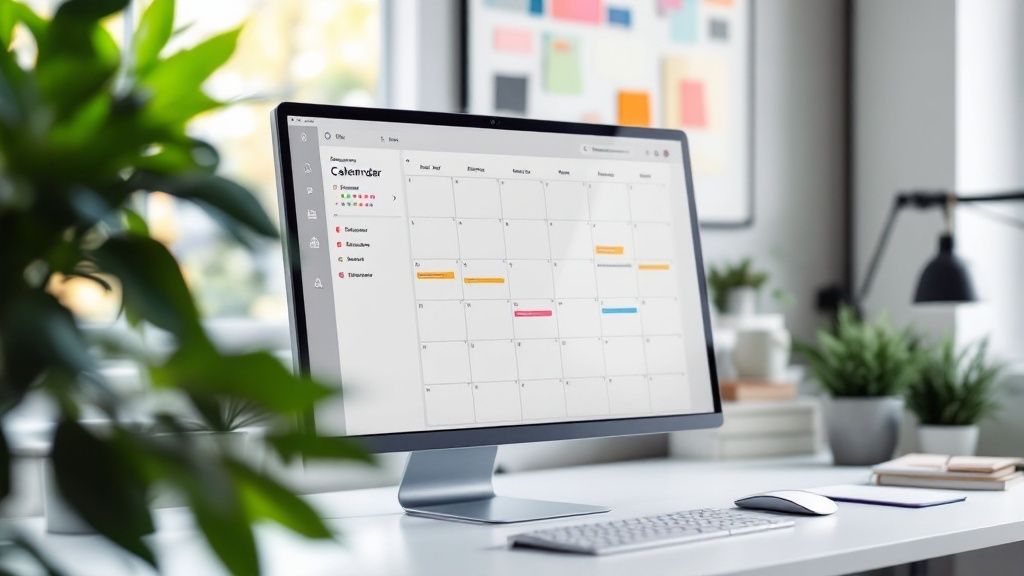
Calendar Tools: A good calendar is more than just a place to park meetings. It should be a proactive guide for your week. Look for one that makes time blocking and color-coding easy, turning it from a simple schedule into a strategic plan.
The real magic happens when these tools integrate. Can you forward an email directly to your task manager to create a to-do? Can your note-taking app create a calendar event from a line of text? When your tools communicate, you remove the little points of friction that lead to disorganization. For a rundown of some great options, check out this list of the best productivity apps that really nail these functions.
The Underrated Power of Voice
One of the biggest obstacles to organization is the act of capturing information itself. You're deep in concentration writing a report, and suddenly you remember you need to email Sarah. Stopping, switching apps, and typing out that reminder can completely shatter your focus.
The best organizational tools are the ones that slot into your workflow so smoothly you barely notice them. They should feel less like software and more like an extension of your own mind.
This is where a good voice-powered tool can make a world of difference. An app like Speak4Me, for instance, lets you handle a ton of organizational tasks without ever touching your keyboard. You can dictate a quick email draft, set a reminder for later, or capture meeting notes just by talking.
It closes the gap between thought and action. Instead of fumbling with your phone to open an app, you can just speak an idea into existence, instantly turning it into text that you can drop into your task manager or calendar later. This simple act keeps you in the flow and ensures those brilliant-but-fleeting ideas don't get lost.
Ultimately, technology should simplify your work, not complicate it. For a tool designed to streamline organization and protect your focus, you can download Speak4Me free on iOS.
Weave Organization Into Your Daily Routine
Let’s be honest: no one keeps their workspace pristine with a single, heroic weekend of cleaning. If that worked, you wouldn't be reading this. Real, lasting organization is all about the small, consistent habits you build over time—the kind that eventually run on autopilot.
Think of it this way: lasting change comes from consistency, not sheer intensity. Instead of trying to reinvent your entire workflow in one go, just pick one thing. What’s that one little organizational black hole that sucks up your time and energy? Maybe it’s the sea of unread emails staring back at you, or the chaotic mess that is your desktop’s downloads folder.
Whatever it is, pick one. Then, commit to one tiny, almost laughably simple action to start chipping away at it.
Link New Habits to Old Ones
The real secret to making a new habit stick is to latch it onto something you already do without thinking. This is often called habit stacking, and it’s brilliant because it removes the need for reminders or willpower. You're just connecting a new behavior to an old, established one.
Here’s what this looks like in the real world:
When I finish my last meeting... I’ll spend five minutes dragging files from my desktop into their proper folders.
While my morning coffee is brewing... I’ll glance at my to-do list and decide on my top three priorities.
Before I shut down my computer for the day... I’ll clear any physical papers or sticky notes off my desk.
See how that works? The old habit acts as a trigger. The new action becomes an automatic part of a sequence you already perform, creating a powerful chain reaction that just happens.
Organization becomes effortless when you design your environment and routines to do the work for you. Make the right choice the easiest choice, and you'll make it every time.
Knowing how to stay organized isn't just a personal skill; it reflects broader economic patterns. It's fascinating to see that while the U.S. nonfarm business sector might see a 3.3% productivity increase, certain manufacturing industries can actually see a drop. This tells us that our organizational strategies have to be smart and tailored to the work we actually do. You can dig into these U.S. productivity trends on bls.gov if you're curious.
Capture Ideas Without Killing Your Momentum
One of the biggest hurdles to building a new routine is that stopping to track it can pull you right out of your workflow. You finally get a small win, like clearing your inbox, but then you have to pause, open another app, and log it. It’s disruptive.
This is where a simple, hands-free tool can be a game-changer. An app like Speak4Me lets you just say what you did or what you need to remember. You can say, "Cleared my inbox to zero," and it's instantly transcribed and saved. No context switching, no breaking your focus. It reinforces the habit without getting in the way.
Ready to build better habits that actually stick? To capture and track your new organizational routines with zero friction, download Speak4Me free on iOS.
Got Questions About Getting Organized? We’ve Got Answers.
Jumping into a full-on organization system can feel like a huge undertaking, and it's totally normal to have questions pop up. Let's tackle some of the most common hurdles people run into when they're trying to build a less chaotic, more productive workday.
Think of this as your practical FAQ for getting—and staying—organized for good.
I’m Completely Overwhelmed. Where Do I Even Begin?
When you’re staring at a mountain of disorganization, the trick is to shrink the change. Forget trying to fix everything at once. Just pick one small thing that’s driving you crazy and give it 15 minutes.
That’s it. You could clear your physical desk or finally triage that overflowing email inbox. For your desk, just toss the obvious trash, put away loose papers, and organize your pens. For your email, just spend those 15 minutes deleting and archiving old messages you know you'll never need again.
Getting that one small win builds momentum. Suddenly, the bigger goal of getting fully organized feels a lot less daunting. The key is to aim for progress, not perfection.
How Can I Stay Organized When My Workload Is All Over the Place?
If your priorities shift by the hour, a rigid schedule is your worst enemy. Flexibility is the name of the game. Instead of mapping out every minute, work from a prioritized master task list.
Each morning, just pick your top 1-3 "must-do" tasks. These are your non-negotiables. This ensures you’re always moving the needle on what truly matters, even when chaos erupts. When new requests fly in, capture them immediately in a digital tool or a simple notebook so they're out of your head.
You can still block out time on your calendar, but be sure to schedule a few "flex time" blocks. These are your buffers for handling the inevitable surprise tasks and interruptions that your job throws at you.
This hybrid approach gives you enough structure to stay in control, but enough agility to handle a dynamic workload without getting completely derailed.
Is There an App That Can Help Me Capture Ideas on the Fly?
Absolutely. Some of the best ideas strike when you're nowhere near a keyboard. This is where voice-to-text apps become incredibly valuable, closing the gap between a random thought and a documented action item.
A fantastic tool for this is Speak4Me. It lets you instantly record thoughts, meeting notes, or new to-do items just by talking. The app quickly transcribes what you say into text, which you can then pop right into your project management tool, notes app, or calendar.
It's way faster than fumbling for a pen and paper or trying to type on your phone, especially when you’re driving or walking. Using a tool like this ensures no great idea gets lost and helps you keep an organized log of your thoughts without breaking your stride.
Ready to capture your thoughts effortlessly and stay on top of your tasks? Speak4Me is designed to support your organizational goals by turning your spoken words into actionable text. Download Speak4Me free on iOS.
Try Speak4Me for Free
