10 Proven Ways to Increase Productivity at Work in 2025

In today's fast-paced professional world, the pressure to accomplish more in less time is constant. Many of us juggle competing priorities, endless notifications, and the lingering feeling that we could be more effective. The key isn't working longer hours, but working smarter. This guide is designed to help you increase productivity at work by introducing ten powerful, field-tested methodologies.
We will move beyond generic advice to provide actionable frameworks that can transform your daily routine, reduce stress, and help you achieve meaningful results. Whether you're feeling overwhelmed or simply aiming to optimize your workflow, these strategies offer a clear path to reclaiming your focus. Imagine finishing your workday feeling accomplished, not exhausted. That's the goal we're aiming for.
Sometimes, the right tool can make all the difference. Absorbing lengthy reports or articles, for example, can be a major time sink. An assistive technology like Speak4Me can be a game-changer, helping you consume information by listening, which frees you up to handle other tasks simultaneously. You can process documents faster and stay ahead of your reading list. If you're ready to start your transformation, let’s dive in.
Ready to reclaim your focus? Download Speak4Me free on iOS and start working smarter. https://apps.apple.com/us/app/id894460403
1. Master Your Schedule with Time Blocking
Time blocking is a powerful strategy to increase productivity at work by turning your to-do list into a concrete schedule. Instead of reacting to tasks as they come, you proactively assign every part of your day a specific purpose on your calendar. This method creates a clear, visual plan, ensuring that your most important work gets the attention it deserves.
By dedicating specific "blocks" of time to individual tasks, you reduce the mental friction of deciding what to tackle next. This focused approach minimizes distractions and helps you enter a state of deep work more easily.
How to Implement Time Blocking
To get started, look at your to-do list and estimate how long each item will take. Then, open your calendar and schedule these tasks into specific slots.
Example: A project manager might block 9:00-11:00 AM for "Deep Work: Finalize Q3 Report," 11:00-11:30 AM for "Respond to Urgent Emails," and 1:00-2:00 PM for "Team Sync Meeting."
This approach works wonders when you have competing priorities or find yourself constantly sidetracked. By committing to a schedule, you give yourself a structured roadmap to follow, which is especially helpful for professionals, students, and individuals managing ADHD. It transforms your day from a series of unplanned events into a sequence of intentional actions.
To further enhance your focus during these blocks, you can use tools to manage information overload. For example, if you need to review a lengthy document or article during a "Research" block, a text-to-speech app can read the content aloud. This auditory approach can assist with comprehension and help you process information without straining your eyes.
Speak4Me can read articles, emails, or reports to you, making it an excellent companion for your time-blocked schedule. By listening to content, you can stay focused on the task at hand, absorb key details more efficiently, and make your productivity blocks even more effective.
Download Speak4Me free on iOS and integrate it into your time-blocking routine today. https://apps.apple.com/us/app/id894460403
2. Embrace the Pomodoro Technique
The Pomodoro Technique is a time management method designed to help you increase productivity at work by using a timer to break down work into focused intervals. Traditionally, these intervals are 25 minutes in length, separated by short 5-minute breaks. This approach combats mental fatigue and maintains high levels of focus by structuring your day into manageable sprints.

This method, popularized by Francesco Cirillo, leverages the idea that frequent breaks can improve mental agility. By alternating between intense focus and short rests, you can prevent burnout and make steady progress on large tasks.
How to Implement the Pomodoro Technique
Start by choosing a task, setting a timer for 25 minutes, and working on it without interruption until the timer rings. Then, take a 5-minute break. After four "pomodoros," take a longer break of 15-30 minutes.
Example: A content creator might use one 25-minute pomodoro to outline an article, another for drafting the introduction, and two more for writing the body paragraphs, taking short breaks in between to stay refreshed.
This technique is especially powerful for professionals who need to produce creative or analytical work, such as software developers, writers, and designers. It provides a clear framework to stop procrastinating and start doing, turning overwhelming projects into a series of achievable steps.
During your short breaks, you can recharge by listening to a quick email or a saved article. Using a text-to-speech tool like Speak4Me allows your mind to rest from screen time while still absorbing necessary information. This makes your breaks both restorative and productive, helping you return to your next pomodoro with renewed focus.
Speak4Me can read content aloud, making it a perfect partner for the Pomodoro Technique. By listening to documents or web pages during your breaks, you can give your eyes a rest and prepare for your next focused session, boosting your overall efficiency.
Download Speak4Me free on iOS and make your Pomodoro breaks even more effective. https://apps.apple.com/us/app/id894460403
3. Getting Things Done (GTD)
Getting Things Done (GTD) is a popular productivity method that helps you manage commitments by getting them out of your head and into a trusted external system. Instead of trying to remember every task, the GTD framework frees up your mental energy to focus on executing your work, which is a key way to increase productivity at work.
Developed by David Allen, this system is built on a five-step process: Capture, Clarify, Organize, Reflect, and Engage. By consistently applying these steps, you create a comprehensive and reliable workflow for managing all your personal and professional responsibilities.
How to Implement GTD
Start by capturing everything that has your attention in an inbox, which can be a physical notebook, a digital app, or your email. As a foundational practice for clearing your mind and capturing all commitments, explore some effective note-taking methods.
Example: An executive assistant might use GTD to manage a complex schedule. They would capture all incoming requests in a digital task manager, clarify if each is actionable, organize them into projects or contexts like "@calls" or "@office," and conduct a weekly review to stay on track.
This method is perfect for anyone feeling overwhelmed by a high volume of tasks and information. It provides a structured way to process inputs and make clear decisions about what to do next. For lengthy reports or emails that land in your inbox, a text-to-speech tool can assist with the "Clarify" step.
Speak4Me can read documents and emails aloud, helping you process information faster and decide on the next action without adding to your screen time. This makes it easier to keep your system organized and your mind clear.
Download Speak4Me free on iOS and integrate it into your GTD workflow today. https://apps.apple.com/us/app/id894460403
4. Eat The Frog
The "Eat The Frog" method is a simple yet powerful technique to increase productivity at work by tackling your most challenging task first. Popularized by Brian Tracy and inspired by a Mark Twain quote, the "frog" is that one critical task you are most likely to procrastinate on. By completing it first thing in the morning, you build powerful momentum and ensure the rest of your day feels more manageable.
This strategy leverages your peak willpower and energy, which are typically highest at the start of the day. Facing your biggest challenge head-on not only guarantees progress on high-impact work but also provides a significant sense of accomplishment that fuels you for hours.
How to Implement Eat The Frog
First, identify your single most important task for the next day. This should be the one thing that will have the greatest positive impact on your work.
Example: A writer might commit to drafting a difficult chapter before checking emails, or a sales professional might make their most challenging cold calls before any other follow-ups.
This approach is highly effective for professionals, students, and anyone who struggles with procrastination on big-ticket items. It creates a proactive mindset, shifting your focus from busywork to what truly moves the needle. You can learn more about how to be more productive with strategies like this to overcome common hurdles.
To help you focus while you "eat your frog," especially if it involves digesting complex information, a text-to-speech tool can be invaluable. For instance, if your frog is to review a dense market analysis report, listening to it can improve comprehension and keep you engaged without distraction.
Speak4Me can read lengthy documents, articles, or project briefs aloud, allowing you to absorb critical details efficiently. Integrating this into your morning routine helps you conquer your most daunting tasks with greater focus and clarity, making the Eat The Frog method even more effective.
Download Speak4Me free on iOS and start your day with a productivity win. https://apps.apple.com/us/app/id894460403
5. The 80/20 Rule (Pareto Principle)
The 80/20 Rule, or Pareto Principle, is a transformative concept to increase productivity at work by focusing on what truly matters. It states that roughly 80% of your results come from just 20% of your efforts. By identifying and prioritizing this vital 20%, you can achieve significant outcomes with less wasted energy.
This principle helps you move beyond being merely busy and instead become effective. It forces you to distinguish between high-impact tasks that drive progress and low-impact activities that consume time with little return.
How to Implement The 80/20 Rule
Start by analyzing your work to identify which activities yield the most significant results. Track your tasks and their outcomes for a week to find patterns.
Example: A sales professional might discover that 20% of their clients generate 80% of the company's revenue. They can then dedicate more time to nurturing these key relationships instead of spreading their efforts evenly across all accounts.
This approach is invaluable when you feel overwhelmed by a long to-do list. It helps you strategically delegate, automate, or eliminate the 80% of tasks that produce minimal results, freeing you to concentrate on the critical 20%.
To apply this principle, you first need to gather and analyze data about your work. Listening to performance reports, project summaries, or weekly analytics can help you identify these high-impact areas without adding more screen time. A text-to-speech tool makes this review process more efficient.
Speak4Me can read your documents, reports, and emails aloud, helping you quickly process information and pinpoint the 20% of activities that drive the most value. By listening to your data, you can stay focused on strategic analysis and make your work significantly more productive.
Download Speak4Me free on iOS and start applying the 80/20 rule to your workflow today. https://apps.apple.com/us/app/id894460403
6. Embrace Deep Work to Maximize Focus
Deep Work is a state of distraction-free concentration that pushes your cognitive capabilities to their limit. This approach, popularized by Cal Newport, involves setting aside dedicated time for intense, focused effort on a single, high-value task. By eliminating interruptions, you create an environment where you can produce exceptional, high-quality work that is difficult to replicate.
This method contrasts sharply with "shallow work," which includes logistical tasks like answering emails or attending routine meetings. While necessary, shallow work is often performed while distracted and doesn't generate significant new value. To truly increase productivity at work, prioritizing deep work sessions is essential for tackling your most demanding projects.
How to Implement Deep Work
Start by scheduling uninterrupted blocks of time into your calendar. Treat these appointments with yourself as seriously as you would a meeting with your boss.
Example: A software engineer might schedule a 90-minute deep work session from 10:00-11:30 AM to code a complex algorithm, putting their phone on silent and closing all unrelated tabs.
This strategy is highly effective for professionals like researchers, writers, or strategists whose roles demand intense concentration. By creating a routine, you train your brain to enter a state of focus more easily, signaling that it’s time to perform at your peak. Batching shallow tasks for other times prevents them from fragmenting your day.
To get the most out of your deep work sessions, especially those involving heavy reading or research, using the right tools can make a significant difference. A text-to-speech reader can help you absorb dense reports or articles without succumbing to digital fatigue, allowing you to maintain focus for longer. Explore other powerful tools in our guide to the best productivity apps.
Speak4Me can read articles, research papers, and project briefs aloud, helping you process information efficiently during a deep work block. Listening to content supports comprehension and focus, making it a perfect tool for professionals, students, and anyone with ADHD looking to minimize distractions and maximize output.
Download Speak4Me free on iOS and make your deep work sessions more powerful and productive. https://apps.apple.com/us/app/id894460403
7. Embrace the Two-Minute Rule
The Two-Minute Rule is a simple yet highly effective strategy to increase productivity at work by tackling small tasks immediately. Popularized by David Allen in his "Getting Things Done" methodology, the principle is straightforward: if a task takes less than two minutes to complete, do it right away instead of deferring it. This prevents minor items from accumulating and creating a sense of overwhelm.
By addressing these quick tasks as they arise, you maintain momentum and keep your to-do list focused on larger, more significant projects. This habit reduces mental clutter and ensures that small but necessary actions don't fall through the cracks.
How to Implement the Two-Minute Rule
Start by training yourself to estimate task duration. When a new task appears, ask yourself if it can be done in two minutes or less. If so, act on it immediately.
Example: A marketing specialist receives an email asking for a quick status update. Instead of flagging it for later, they type a one-sentence reply and send it. Other examples include filing a document immediately after reviewing it or making a quick confirmation call.
This approach is perfect for preventing administrative debt and keeping your workspace organized. It is particularly useful during transition periods, like the few minutes before a meeting starts or right after you return from a break.
For tasks that require a bit more focus but still fit a quick timeframe, technology can help you stay on track. If a colleague sends a short article or an important email to review, using a text-to-speech tool can help you process it without losing your flow.
Speak4Me can read text aloud, allowing you to absorb information from emails or documents quickly and efficiently. This supports the Two-Minute Rule by helping you clear small informational tasks from your queue, keeping you focused and productive throughout the day.
Download Speak4Me free on iOS and make your two-minute tasks even more manageable. https://apps.apple.com/us/app/id894460403
8. Manage Your Energy, Not Just Your Time
Energy management is a game-changing approach to increase productivity at work by focusing on the quality of your energy, not just the hours on the clock. Instead of forcing yourself to work when you're drained, this strategy involves aligning your most demanding tasks with your natural energy peaks. This method acknowledges that high-quality output depends on high-quality energy.
By understanding your body's natural rhythms, you can schedule deep, focused work for when you feel most alert and creative. This ensures your best efforts are applied to your most important priorities, leading to better results with less struggle.
How to Implement Energy Management
Start by tracking your energy levels throughout the day for a week to identify your personal patterns. Once you know your peaks and troughs, you can redesign your schedule to work with your body, not against it.
Example: A developer might schedule complex coding from 9:00-11:00 AM when their focus is highest, reserve 1:00-2:00 PM for routine administrative tasks during a post-lunch slump, and block 3:00-4:00 PM for collaborative meetings when their energy rebounds.
This technique is ideal for anyone whose role demands creativity, critical thinking, or deep concentration. By matching the task to your energy level, you can avoid burnout and maintain a more sustainable pace. You can learn more about how to improve workplace productivity with energy management on speak4me.io.
To preserve mental energy during low-focus periods, you can use technology to handle monotonous tasks. For example, instead of reading through a long email thread or report when you feel tired, let a text-to-speech tool do the work for you.
Speak4Me can read documents, articles, and emails aloud, helping you process information effortlessly during your lower-energy blocks. This allows you to stay productive without depleting your mental reserves, making it a perfect tool for an energy-managed workday.
Download Speak4Me free on iOS and start aligning your work with your natural energy flow. https://apps.apple.com/us/app/id894460403
9. Batch Processing
Batch processing is a highly effective method to increase productivity at work by grouping similar, repetitive tasks and completing them in a single session. Instead of scattering related activities throughout your day, you dedicate specific blocks of time to them. This approach minimizes context switching, the mental drain that occurs when your brain shifts between different types of work.
By focusing on one type of task, you maintain a consistent mental mode, which reduces fatigue and significantly boosts efficiency. This technique, popularized by productivity experts like Tim Ferriss, leverages the same principles found in lean manufacturing to streamline your workflow.
How to Implement Batch Processing
Begin by identifying recurring tasks on your to-do list that can be grouped together. Then, schedule dedicated blocks in your calendar to complete them all at once.
Example: A marketing specialist might dedicate Monday morning to "Content Creation," writing all social media posts for the week. They could then batch "Administrative Work," like expense reports and scheduling, into a one-hour block on Friday afternoon.
This strategy is perfect for managing a high volume of small, similar tasks that can otherwise disrupt deep work. It allows you to process emails, return phone calls, or review documents with greater speed and focus.
To make your batching sessions even more productive, use tools that streamline information processing. For instance, if you have a batch of articles or reports to review, a text-to-speech app can read them aloud. This helps you get through the material faster and retain information without adding to screen fatigue.
Speak4Me can turn any text-based content into clear audio, making it an ideal tool for your "Reading and Research" batch. Listen to reports, articles, and long emails while you take notes, helping you process information efficiently and stay on task.
Download Speak4Me free on iOS and transform your batch processing sessions today. https://apps.apple.com/us/app/id894460403
10. Prioritize with the Eisenhower Decision Matrix
The Eisenhower Decision Matrix is a powerful framework that helps you increase productivity at work by sorting tasks based on urgency and importance. Instead of treating all tasks equally, this method forces you to evaluate what truly requires your immediate attention versus what is simply "busy work." It provides a clear, logical system for prioritizing your efforts.
By categorizing activities into four distinct quadrants, you can make smarter decisions about how to allocate your time and energy. This approach helps you focus on high-impact work that aligns with your long-term goals, rather than just reacting to the most recent demand.
How to Implement the Eisenhower Decision Matrix
To use the matrix, evaluate each task on your to-do list and place it into one of four quadrants: Do First (urgent and important), Schedule (important but not urgent), Delegate (urgent but not important), or Eliminate (neither).
Example: A project manager would place a critical bug fix in "Do First," planning the next product sprint in "Schedule," a request for routine data in "Delegate," and an irrelevant industry newsletter in "Eliminate."
The visual below illustrates the simple decision-making process for categorizing any task.
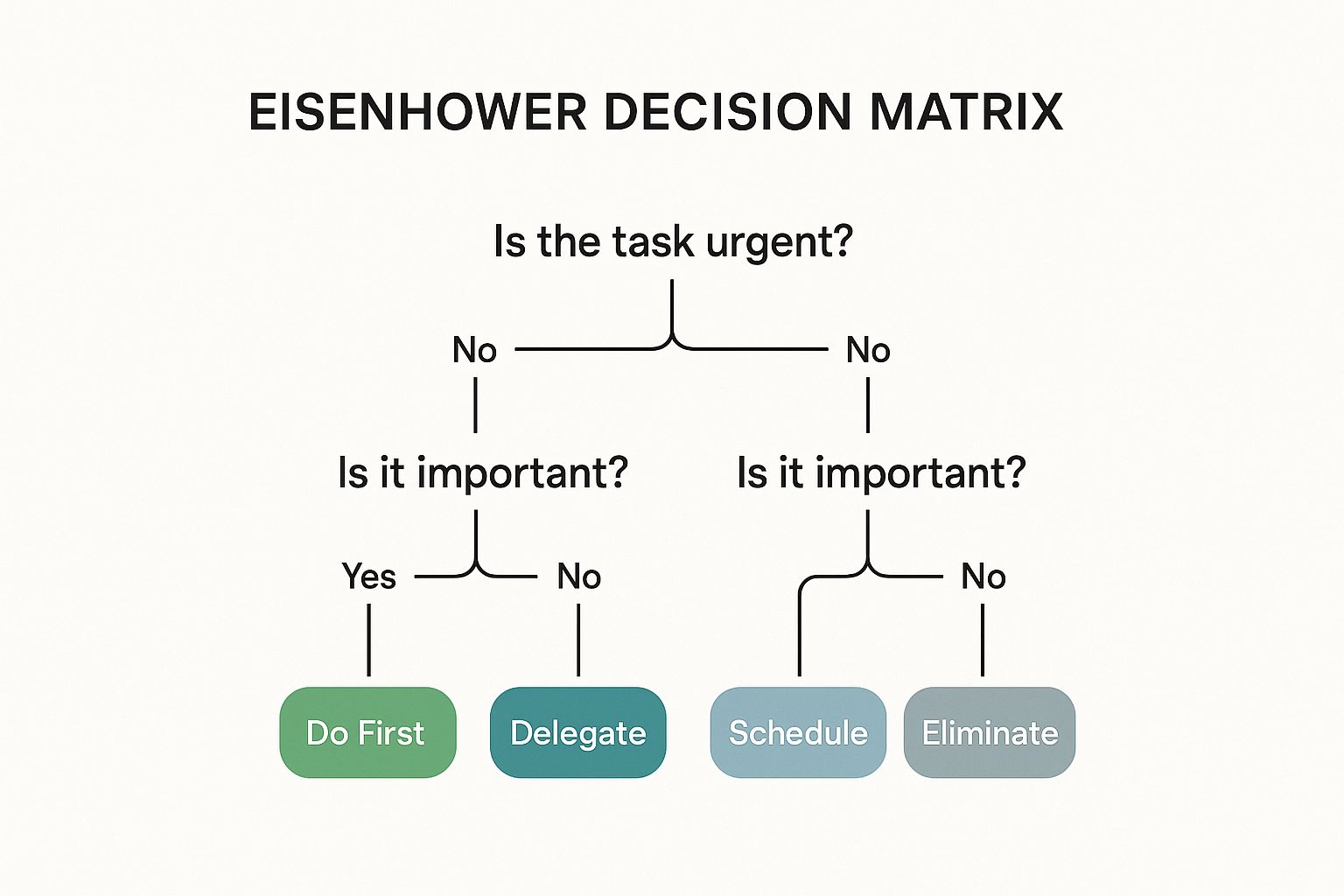
This flowchart clarifies how to quickly assign tasks to the correct quadrant, turning a cluttered to-do list into an actionable plan.
When you have a list of tasks in your "Schedule" quadrant, it can be overwhelming to review them all. Speak4Me can read your task lists, project briefs, or background documents aloud, assisting you with planning your next steps without adding more screen time. This auditory review can help you process information and prioritize more effectively.
Download Speak4Me free on iOS and gain a clearer perspective on your most important tasks. https://apps.apple.com/us/app/id894460403
Top 10 Productivity Strategies Comparison
Productivity Method | Implementation Complexity 🔄 | Resource Requirements ⚡ | Expected Outcomes 📊 | Ideal Use Cases 💡 | Key Advantages ⭐ |
|---|---|---|---|---|---|
Time Blocking | Medium - requires planning and time estimation | Moderate - calendar or scheduling tools | Better focus, reduced multitasking, accountable time usage | Structured workdays, multitasking prevention | Reduces decision fatigue, visual schedule |
Pomodoro Technique | Low - straightforward timer-based intervals | Low - timer app or device | Improved focus, manageable workload, reduced burnout | Tasks needing short bursts of focus | Combats procrastination, regular breaks |
Getting Things Done (GTD) | High - setting up capture and review systems | Moderate to high - apps or notebooks | Reduced mental clutter, clear priorities, scalable task management | Complex workloads, multitasking environments | Ensures nothing is missed, organized system |
Eat The Frog | Low - simple prioritization principle | None to low | Early completion of critical tasks, momentum building | High-priority tasks, morning productivity | Prevents procrastination, maximizes energy |
The 80/20 Rule | Medium - requires data analysis and prioritization | Moderate - tracking and analytics | Efficient resource use, focus on high-impact tasks | Productivity improvement, decision making | Dramatically improves efficiency |
Deep Work | High - requires discipline and environment setup | Moderate - tools for distraction blocking | High-quality output, skill development, higher fulfillment | Cognitively demanding tasks, skill building | Produces valuable work, reduces shallow tasks |
Two-Minute Rule | Low - simple immediate action guideline | None | Prevents backlog, maintains momentum | Small tasks and quick decisions | Reduces mental overhead, quick wins |
Energy Management | Medium to high - requires self-tracking and lifestyle adaptation | Low to moderate - tracking tools | Sustained productivity, reduced burnout | Workflows aligned with personal energy levels | Maximizes peak productivity, sustainable |
Batch Processing | Medium - needs planning and task grouping | Low to moderate | Reduced task switching, increased efficiency | Similar repetitive tasks, reduce context switching | Improves efficiency, builds momentum |
Eisenhower Decision Matrix | Medium - requires prioritization and regular review | Low - simple frameworks and tools | Focus on important tasks, reduced stress | Task prioritization and time management | Clear urgency-importance framework |
Your Next Step Towards Effortless Productivity
You have just explored ten powerful frameworks designed to help you increase productivity at work. From the laser-focused sprints of the Pomodoro Technique and the strategic clarity of the Eisenhower Matrix to the decisive action of "Eating The Frog," each method offers a unique pathway to reclaiming your time and achieving your professional goals. The journey to heightened efficiency isn't about mastering all ten at once. Instead, the real power lies in thoughtful, incremental change.
The most crucial takeaway is that sustainable productivity is a personalized system, not a one-size-fits-all solution. Your goal should be to select one or two strategies that genuinely align with your workflow, your personality, and the specific demands of your role. Perhaps the simplicity of the Two-Minute Rule will help you clear away small, nagging tasks, or the principles of Deep Work will allow you to finally tackle that complex project demanding your full attention. The key is to start small, experiment, and build momentum.
Weaving It All Together
A common thread connecting these diverse strategies, from Time Blocking to GTD, is the need to manage information and maintain focus in a world filled with distractions. To truly execute these plans, you need tools that support your cognitive workflow. For those managing complex projects, understanding how to prioritize and execute under pressure is critical. To achieve rapid progress and meet tight deadlines, a practical guide to fast track project management strategies offers invaluable insights for accelerating your projects and keeping them on schedule.
Think about the sheer volume of reports, emails, and articles you need to process daily. This is where a supportive tool can become a game-changer. By converting text to audio, you can absorb critical information while commuting, exercising, or taking a screen break, effectively supporting techniques like Batch Processing. This simple shift helps reduce visual fatigue and frees you up to multitask intelligently, turning downtime into productive learning time.
Your First Actionable Step
True transformation begins with a single, simple action. Don’t let this list become just another article you’ve read. Choose one method. Commit to trying it for one week. Observe the results, refine your approach, and build a system that works for you, not against you. This is how you move from merely knowing how to increase productivity at work to actually living it.
Ready to enhance your focus and absorb information more efficiently? Speak4Me helps you convert any text into clear audio, making it easier to stay on top of your reading list and reduce screen time. Download Speak4Me free on iOS and start building a more productive workflow today.
Try Speak4Me for Free
