Your Guide to a PDF to Audio Converter
A good PDF to audio converter can completely change your workflow. It takes those static, text-heavy documents and turns them into audio files you can listen to anytime, anywhere. Think about it—you could get through your morning reports during your commute or even study dense research papers at the gym. It’s all about turning your reading time into productive listening time.
Why You Should Turn Your PDFs into Audio
Let's be real, finding a quiet moment to sit down and read through a long document is a luxury most of us don't have. A PDF to audio converter gives you that time back by creating new pockets in your day for learning and staying on top of things.
For professionals, this could mean absorbing an industry report while making dinner. For students, it's a way to review lecture notes or textbook chapters while walking to class, making studying feel less like a chore and more a part of your daily routine. With Speak4Me, you can transform reading from a stationary task into an on-the-go activity.
Boosting Accessibility and Comprehension
Beyond just pure convenience, these text-to-speech tools are incredibly important for accessibility. They open up digital content for individuals with visual impairments or reading challenges like dyslexia by providing an auditory alternative.
Hearing the text while also seeing it can be a huge help for focus and memory, too. It engages multiple senses, which often helps information stick. And the technology behind it is getting better every single day.
AI-powered PDF to audio converters have completely changed how we interact with text. They use sophisticated text-to-speech engines, sometimes paired with Optical Character Recognition (OCR), to read scanned documents and produce audio that sounds genuinely human.
The Power of Smart Technology
Today's converters are much smarter than the robotic voices of the past. They don't just read words; they interpret the document's structure. Understanding the bigger picture of using AI for content creation helps you appreciate just how useful it is to have your PDFs in audio format. An app like Speak4Me, for instance, is designed to intelligently navigate complex layouts, giving you a seamless listening experience without awkward pauses or jumbled sections.
Ready to take back your time and absorb information in a whole new way? Download Speak4Me free on iOS and start listening to your documents today.
Getting Started with Speak4Me

Jumping in and turning your first PDF into audio is surprisingly easy. The whole process starts with getting your files into the Speak4Me app, which we’ve designed to be intuitive for everyone—no tech wizardry required. You shouldn’t have to be an expert to use a powerful pdf to audio converter.
First things first, you need to get your documents into the app. Speak4Me is built to connect with the services you already use every day, making file imports a breeze.
Cloud Services: Pull in PDFs directly from your Google Drive, Dropbox, or iCloud with just a couple of taps.
Email Attachments: If you get a report or a contract sent to your inbox, you can open it right in Speak4Me without having to download it first.
On Your Device: Got a PDF saved on your phone or tablet? No problem. The app can grab those too.
This kind of flexibility means that wherever your files are stored, you can start listening almost instantly. The goal is to get you from document to audio with as few clicks as possible.
A Smooth and Simple Experience
Let's be honest, technology should work for you, not the other way around. From the moment you import your first file, you'll find the experience is clean and straightforward. We’ve deliberately avoided confusing settings and complicated menus.
The real aim here is to make text-to-speech feel like a natural part of your routine. It's about making information more accessible, whether you're trying to multitask on your commute or you simply prefer listening over reading.
Once your PDF is loaded, you're literally one tap away from pressing play. If you're curious about the tech that makes this happen, you can learn more about our text-to-speech engine. This immediate playback makes it perfect for converting and listening on the go, fitting right into a busy schedule.
Speak4Me Feature Highlights
To give you a clearer picture, here’s a quick rundown of what makes Speak4Me stand out. These features are all designed to create a practical and powerful tool for anyone who needs to convert text to audio.
Feature | Benefit for You |
|---|---|
Multi-Source Import | Easily access and import files from cloud storage, email, or your device. |
High-Quality Voices | Choose from a wide range of natural-sounding voices and accents. |
Adjustable Speed | Slow down for complex topics or speed up for a quick review—you're in control. |
Offline Access | Listen to your converted documents anywhere, even without an internet connection. |
Highlighting | The app highlights text as it's being read, making it easy to follow along. |
Each feature is built with real-world use in mind, from the student studying on the bus to the professional catching up on reports.
The best way to see how it works is to try it yourself. Why not give it a spin? Download Speak4Me for free on iOS and import your first document to see just how simple it is.
Turning Your First PDF Into an Audiobook
Alright, let's get your first PDF converted. It’s a surprisingly straightforward process that can completely change how you get through your reading list.
Imagine you've got a dense, 50-page research paper that's due for review, but your schedule is packed. Instead of carving out hours to sit and read, you can listen to it during your commute or while walking the dog. We'll use Speak4Me to make that happen.
First things first, you need to get that paper into the app. You can pull it in directly from your email, Google Drive, or wherever you have it stored. Once imported, you'll see it pop up in your Speak4Me library. Just give it a tap to open it up.
Dialing in the Perfect Voice and Speed
Before you hit play, take a moment to customize your listening experience. This is where the magic really happens. Speak4Me gives you a roster of incredibly natural-sounding voices to choose from. Spend a few seconds sampling them—you might find a calm, steady voice works best for that complex research paper, while a more upbeat voice is perfect for a novel.
Next up is playback speed. For a document packed with new information, starting at normal speed (1.0x) is probably your best bet to make sure you catch every detail. But if you're just refreshing your memory on a topic you already know well, feel free to crank it up to 1.25x or even 1.5x. The goal is to find that sweet spot where you can absorb the information comfortably without feeling rushed.
This little workflow shows just how fast you can go from a static PDF to a listen-anywhere audio file.
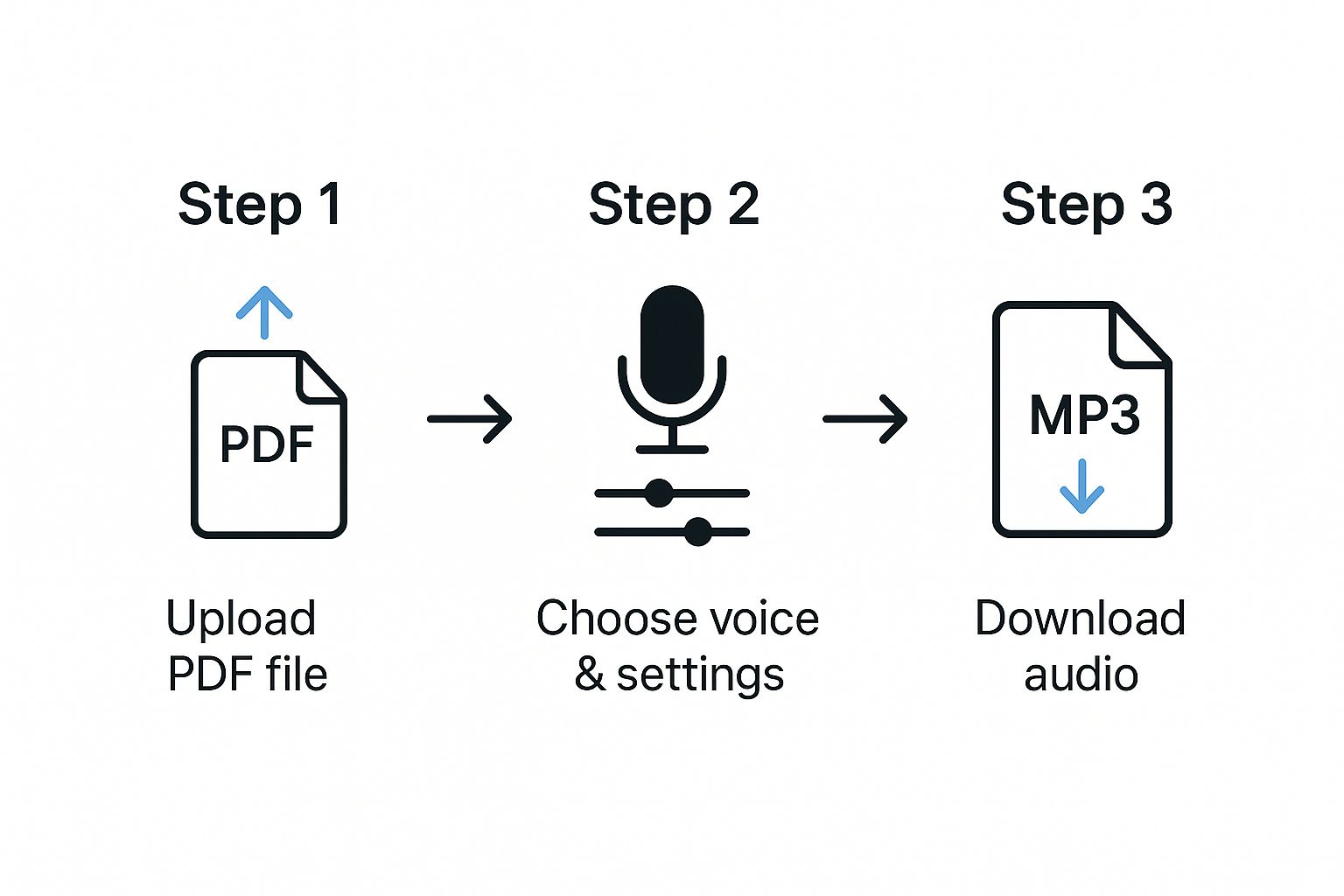
As you can see, the path from uploading your file to having a ready-to-play audio version is designed to be quick and intuitive.
Let the Conversion Begin
With your voice and speed settings locked in, you're ready to roll. Simply press the play button.
Instantly, Speak4Me gets to work, reading the text aloud while highlighting each word on the screen as it goes. This combination of seeing and hearing the words at the same time is a huge help for staying focused and really retaining the information.
It's no surprise that tools like this are taking off. The market for file converter software, which includes PDF-to-audio apps, is expected to balloon from USD 3.48 billion in 2023 to USD 7.88 billion by 2032. It's clear people are looking for smarter, more flexible ways to get through all the content on their plates.
Being able to instantly convert a document and just listen is a game-changer. It turns dead time—like driving or doing chores—into a chance to learn something new.
And it doesn't just stop at listening. For those who want to take their document interaction even further, you can check out our guide on the best tools to chat with PDF documents.
That’s it! You've successfully turned your first document into audio. It’s a simple but powerful way to stay on top of your reading and boost your productivity, no matter how chaotic your day gets. Experience it yourself when you Download Speak4Me free on iOS.
Personalizing Your Listening Experience
A good pdf to audio converter reads words aloud. A great one lets you craft a listening session that’s just right for you. The real magic isn't just in the conversion; it's in the small tweaks that make the experience genuinely personal and productive.
After all, you wouldn't listen to a dense academic paper the same way you’d skim a weekly newsletter, right? For complex, technical documents, you might slow the narration way down to really soak in every concept. But for a quick news update, you can crank up the speed to get the highlights and move on with your day.
Speak4Me puts that kind of control right at your fingertips, letting you adjust the playback speed on the fly. This one feature alone is a game-changer, as it lets you match the audio's pace to the content's complexity and your own listening style.
Finding a Voice That Clicks
Speed is one thing, but the voice itself is just as important, especially if you plan on listening for a while. Let's be honest, a harsh, robotic voice is distracting at best and grating at worst. A clear, natural-sounding voice, on the other hand, makes listening feel effortless and helps you stay focused.
Speak4Me comes with a whole library of high-quality, human-like voices. We recommend spending a few minutes exploring the options. You might find that a calm, steady voice is perfect for business reports, while a warmer, more engaging tone works better for that ebook you've been meaning to read.
Choosing a voice you genuinely enjoy listening to can make a massive difference in comprehension and listening fatigue. It’s a small detail that pays huge dividends, especially during longer sessions.
Navigating Your Audio Like a Pro
Listening isn’t a passive activity. Sometimes you need to rewind to catch a specific number, or maybe you want to jump ahead past a section that isn’t relevant. Speak4Me is clearly designed for this kind of active listening, with controls that just make sense.
Skip Forward/Backward: You can easily hop between paragraphs or by a set time interval to find exactly what you're looking for.
Replay Sections: Instantly replay the last sentence or paragraph to clarify something without losing your place.
Follow Along Visually: The app highlights the text as it's read, so you always know exactly where you are in the document.
These tools put you in complete command of your content. Ready to fine-tune your own listening experience? Download Speak4Me free on iOS and see what a difference a personal touch can make.
Getting the Best Possible Audio Quality
The old saying "garbage in, garbage out" definitely applies here. The quality of your original PDF has a huge impact on how clear the final audio will be. For the absolute best results, always try to start with a clean, text-based PDF instead of a scanned image. Crisp, digital text is what lets the pdf to audio converter read every word flawlessly.
Of course, sometimes a scanned document is all you've got. The good news is that Speak4Me is built to handle these less-than-ideal files. It uses some clever tech to figure out tricky layouts—like documents with multiple columns, tables, or charts—and reads them in a way that actually makes sense.
A Quick Tip for Managing Big Files
If you're converting something massive, like a full textbook or a dense annual report, a little prep work can make a world of difference. We've found that breaking a huge file down into smaller chunks, like individual chapters or sections, makes the whole process smoother. It helps ensure playback never skips and keeps your audio library from getting cluttered.
Think of it like creating your own personal collection of audiobooks. A bit of organization upfront makes it so much easier to find exactly what you're looking for later on.
It's no surprise that tools like this are becoming more popular. According to Verified Market Reports, the market for audio converters is growing rapidly because we all want to consume content on the go.
Making these small adjustments can really elevate your listening experience. Download Speak4Me free on iOS and hear the difference for yourself.
Got Questions About Turning PDFs into Audio?
If you're new to PDF to audio converters, you've probably got a few questions. That's completely normal. Let's walk through some of the most common things people ask so you can get started with confidence.
Can I listen without an internet connection?
Yes, you absolutely can. After Speak4Me converts your PDF, the audio file is saved right on your device.
This is a game-changer for anyone who’s on the go. Think about your daily commute on the subway, long flights, or just any spot where Wi-Fi is flaky. You can keep listening to your documents without a single interruption.
Does it work with scanned documents or pictures?
It sure does. Speak4Me is built with some pretty smart Optical Character Recognition (OCR) technology. This means it can "read" the text from scanned PDFs and even images you've taken with your phone.
So, that stack of printed meeting notes or the class handout you just got? Just scan it, and you can turn it into an audio file.
Pro Tip: For the best results with scans, make sure your image is sharp and the text is as clear as possible. Good lighting and a steady hand go a long way.
What about different languages and voices?
You're not stuck with a single robotic voice. The app supports a wide variety of languages, and within each one, you'll find a selection of different high-quality, natural-sounding voices.
You can hop into the settings to find an accent and tone that you actually enjoy listening to. It makes the whole experience feel much more personal and less like a computer reading to you.
Ready to give it a try? The best way to see how it all works is to test it yourself. Download Speak4Me for free on iOS and start turning your documents into audio today.
Try Speak4Me for Free
