Ultimate Read Aloud PDF App Guide
Ever found yourself with a pile of PDFs to get through but zero time to sit down and actually read them? That’s where a good read aloud PDF app comes in. It turns those static documents into audio you can listen to anywhere, letting you catch up on reports, study guides, or articles while you're driving, at the gym, or just making dinner.
It’s a simple but powerful switch that can help you cut down on screen time and absorb information without being glued to your desk. Think of it as your personal reader, making your content accessible whenever you're ready to listen.
Why Bother With a Read Aloud PDF App?

We all know the feeling of screen fatigue. Staring at dense text for hours isn't just tiring; it can make it tough to stay focused. A tool like Speak4Me completely changes the game by turning reading into an active listening experience. It's a fantastic solution for anyone who learns better by hearing or simply wants to make their day more efficient.
Instead of being stuck at your computer, imagine listening to a detailed research paper on your morning walk or getting through work memos during your commute. Suddenly, those pockets of time in your day become productive opportunities.
Get More Done and Stay Focused
When you convert text to speech, you're giving your brain another way to process the information. For many people, hearing and seeing the text at the same time really boosts how much they remember. It also opens up access for individuals who struggle with reading large walls of text.
Here’s what Speak4Me assists with:
Multitask like a pro: Listen to important documents while you're cooking, cleaning, or exercising.
Give your eyes a rest: Cut down on eye strain without pausing your work or studies.
Absorb information better: Auditory input can reinforce what you're reading, a big reason people love the benefits of text-to-speech for reading books.
The move toward audio-first content isn't just a trend; it's a real shift in how we want to get our information. A solid read aloud PDF app has gone from a nice-to-have gadget to an essential part of any modern productivity toolkit.
The numbers back this up, too. The global market for book reading apps hit USD 16.7 billion in 2023 and is expected to nearly double by 2033, largely because more people want audio features. You can dig into the specifics of this growth over at DataHorizzon Research.
Ready to change the way you read your documents? Download Speak4Me free on iOS and start listening.
Getting Started with Your First PDF
Let's dive right in and get your first PDF into Speak4Me. We designed the app to be straightforward, so you can go from document to audio in just a few moments.
Getting your file into the app is simple. You can import it directly from your device's Files, pull it from a cloud service like Google Drive or Dropbox, or even use the share option from another app. Speak4Me handles all of them without a fuss.
Your First Listening Session
Once your document is imported, you'll see it in your library. Just tap on it to open. From there, you can pick a voice that you like and hit the play button. That’s really all there is to it—no complicated menus or a steep learning curve. The idea is to make it a great read aloud pdf app right out of the box.
To make things even smoother, a little organization goes a long way. We find it helpful to create folders for different projects, like "Weekly Reports" or "Class Readings." This keeps your library from getting cluttered. You can also bookmark important pages, which is a lifesaver when you need to jump back to a specific chart or a key paragraph.
Choosing the right tool always comes down to what you personally need. This guide helps break down what to look for.
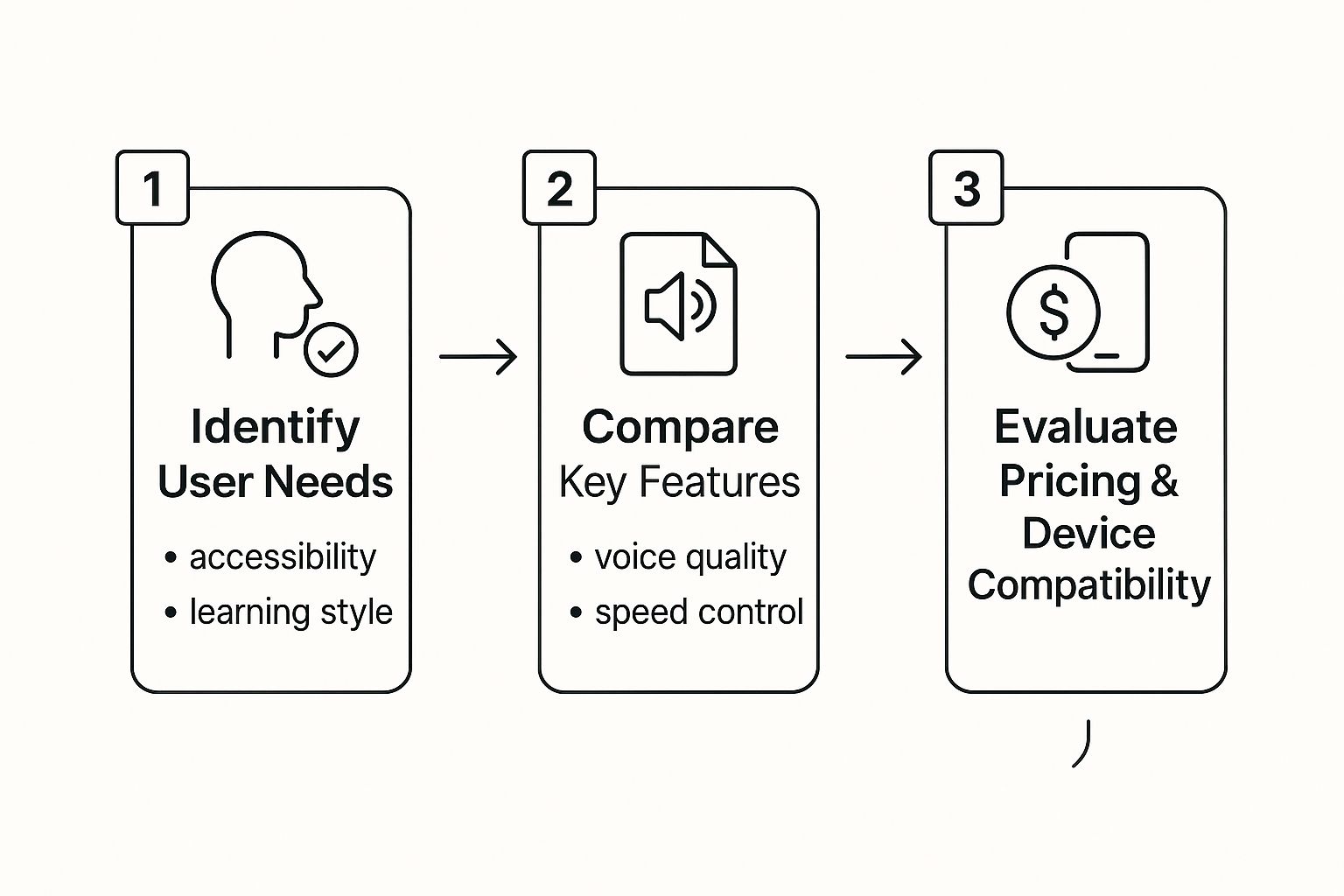
As you can see, the best approach is to first think about your own goals—whether it’s for accessibility, studying, or just catching up on reading. Then, you can compare features like voice quality and platform support to find the perfect fit.
A great user experience isn’t just about powerful features; it’s about how quickly you can start using them. The goal is to spend less time figuring out the app and more time listening to your content.
For more tips and tricks, check out our detailed guide on converting PDF to speech. Following these simple steps will help you have a seamless first listening session.
Ready to try it yourself? Download Speak4Me free on iOS to import your first PDF and discover a smarter way to read.
Customize Your Listening Experience
Getting the audio settings just right can make all the difference in how you take in information. Let's be honest, a robotic voice or a playback speed that feels rushed is just plain distracting. That’s why Speak4Me gives you the controls to dial in the entire experience to what works best for you.
This kind of personal touch is more important than ever. The mobile reading app market is growing fast—it's projected to hit USD 5.73 billion by 2025. As more of us use apps to read on the move, the ability to tweak the experience is what separates a good tool from a great one. If you're curious about the numbers, you can dig into the trends in this report from Cognitive Market Research.
Finding Your Perfect Voice and Speed
The default settings are a decent place to start, but the magic happens when you start playing around. Speak4Me has a whole library of natural-sounding voices with different accents and languages. We recommend trying a few to see which one clicks with the material you're listening to.
Here are a couple of go-to strategies:
For dense academic papers: Pick a voice with a clear, neutral tone. It helps you focus on the complex stuff without getting sidetracked.
For casual articles or reports: A warmer, more conversational voice usually makes for a more pleasant listen.
After you've settled on a voice, it's time to play with the speed. Start at a normal pace and nudge it up or down. You'd be surprised how quickly your brain adjusts to a slightly faster speed, letting you get through your documents much more efficiently.
The real goal here is to find that sweet spot where listening feels effortless. When the audio just flows, your brain can stop thinking about the app and focus completely on the content.
A top-notch read aloud pdf app needs to be flexible. For instance, if you're in a noisy coffee shop, you can crank the volume and maybe even lower the pitch a bit for clarity. At home, a softer, more relaxed setting works perfectly.
Don't hesitate to create different presets for different documents. The settings that work for a technical manual probably aren't ideal for a novel. Taking a minute to adjust things upfront can make a huge difference in your focus and how much you remember later.
Ready to find your perfect audio setup? Download Speak4Me free on iOS and start personalizing your listening today.
Use AI Summaries for Faster Insights
Sometimes you just need the highlights from a dense document, not every single word. This is where a modern read aloud pdf app like Speak4Me really shines, moving way beyond simple narration. The built-in ChatWithMe feature essentially turns your PDF into a personal assistant you can talk to.
Instead of just hitting play and listening to the whole thing, you can jump right in and ask questions. Got a long research paper? Just upload it and ask, “What are the key findings of this study?” The AI digs through the text and pulls out the answer for you. It’s like having a conversation with your document.
This kind of interactive feature is a huge reason the book reading apps market, valued at USD 1.2 billion in 2023, is projected to hit USD 2.56 billion by 2031. People want smarter, more accessible ways to get through their reading material.
Get Answers Instantly
For students cramming for an exam or professionals on a tight deadline, this feature can be a lifesaver. You can zero in on the exact piece of information you need without wasting time scrolling and rereading.
For instance, you could ask:
“Summarize section three in two sentences.”
“What’s the definition of ‘cognitive load’ in this text?”
“List all the statistics about market growth.”
ChatWithMe acts as your personal research assistant, saving you time and letting you focus on what actually matters. It’s the bridge between just reading and truly understanding.
Features like AI summaries are just one piece of the puzzle. If you're curious, you can learn more about the broader field of AI to see how these tools are evolving.
By turning your documents into conversational partners, Speak4Me helps you work smarter, not harder. Ready to see how an AI assistant can speed up your workflow? Download Speak4Me free on iOS and start getting insights from your PDFs in a fraction of the time.
Getting the Most Out of Your PDF Workflow
To truly get the hang of a read aloud pdf app, you need to make it a natural part of your day. It’s not just about pressing a button; it's about building a smarter system that helps you get more done.
Start by getting your documents in order right inside Speak4Me. Treat it like a digital filing cabinet, creating separate folders for your client projects, online courses, and research papers. This simple habit means you’re not wasting time scrolling endlessly to find what you need.
Another trick is to really get familiar with the playback controls. Learning to use the skip-ahead and rewind functions lets you move through chapters and sections quickly, much like you'd skim a real book to find the good parts.
Fine-Tune Your Study and Work Habits
A little prep work goes a long way. If you're dealing with a scanned PDF, double-check that the quality is decent. A clear, high-resolution scan means the text recognition will be spot-on, giving you a much smoother and more accurate narration.
Here are a few more things we do to build a solid workflow:
Drop Bookmarks First: Before you even start listening, quickly scan the PDF and bookmark key definitions, important data, or the main takeaways. This lets you jump directly to the most critical information later on.
Listen and Type: Keep a note-taking app open while Speak4Me is reading. Combining listening with typing helps the information stick by engaging multiple senses at once.
Lean on Accessibility Features: Don't forget to check out settings like spoken highlights. Having the app visually track the words as they're read is a game-changer for keeping your focus sharp.
When you start combining these small habits, Speak4Me stops being just a reader and becomes a core piece of your productivity toolkit. It actively supports you to work and learn more effectively.
For more ideas, check out our guide on how to boost your productivity with a text-to-speech app.
Ready to build a smarter workflow? Download Speak4Me free on iOS and start putting these tips into practice.
Got Questions? We’ve Got Answers.
Jumping into a new app always brings up a few questions. We get it. Here are some of the most common things people ask about using a read aloud pdf app like Speak4Me, with straightforward answers to help you get started.
What Kinds of PDFs Work Best with Speak4Me?
Speak4Me is built to handle almost any document you throw at it, but it really shines with text-based PDFs. Think articles, reports, and ebooks—anything where you can highlight the text with your cursor.
What about scanned documents or image-based PDFs? The app's performance will depend on the quality of the scan. For the clearest, most accurate narration, always aim to use a high-quality, text-based PDF. It makes a world of difference.
How Exactly Does the ChatWithMe AI Summary Work?
Think of ChatWithMe as having a direct conversation with your document. It's powered by some pretty smart AI that reads and understands the content of your PDF.
You just pop open the chat window and ask a question. You could ask for a quick summary, the definition of a specific term, or to find a key statistic. The AI then scans the file and pulls the answer straight from the text, saving you the time of having to read through everything yourself.
Is My Data Kept Private and Secure?
Absolutely. Your privacy is a top priority for us. Speak4Me processes your documents right on your own device whenever possible, which means your files never have to leave it.
For features that need the cloud, like ChatWithMe, we use secure, encrypted connections. We lay it all out in our privacy policy, which we’d recommend giving a read for the full details on how we handle your information.
We know trust is earned. Our commitment is to keep your documents and data safe, whether you're just listening to a file or chatting with the AI.
Where Do I Go if I Need Help?
If you hit a snag or just have a question, help is never far away. The easiest way to get support is right inside the app—just tap the Help icon. You can also head over to our support page for quick answers.
For anything more specific, you can send our team a message directly through the feedback option in the settings menu. We genuinely appreciate hearing from you and are always here to help out.
Ready to turn your documents into audio and get instant answers from your files? It's time to give Speak4Me a spin.
Try Speak4Me for Free
