How to Read Text Online Out Loud Effortlessly
Let's be honest, staring at a wall of text on a screen can be a real drag. An app that can read text online out loud completely changes the game. It turns those static articles, dense reports, and long-winded documents into an audio experience you can take anywhere.
Turn Your Screen into an Audio Experience
We're all swimming in a sea of digital content, and screen fatigue is a very real problem. Spending hours glued to glowing rectangles leads to tired eyes and a drained mind, making it tough to actually absorb what you're reading. This is where text-to-speech technology comes in, essentially turning your device into a personal narrator.
Why Listening is the New Reading
We’re all trying to do more with our time, but reading on a screen demands your full visual attention. You can't exactly read a project brief while you're driving or walking the dog. An audio reader like Speak4Me sets you free.
It lets you get through your reading list while you’re busy with other things.
Boost Your Productivity: Get through work reports or industry news during your commute.
Stay in the Loop: Catch up on those long articles you’ve been saving while you’re at the gym or doing chores.
Make Content Accessible: It also supports different learning styles and assists anyone with visual impairments or reading difficulties like dyslexia.
And this isn’t just a niche tool. The demand is booming. The global text-to-speech market hit USD 3.45 billion in 2024 and is only getting bigger. A major reason for this growth is the push for better accessibility, especially considering the 2.2 billion people globally who have some form of vision impairment. You can read more about these text-to-speech market trends here.
When you switch from reading to listening, you engage different parts of your brain. For many people, hearing the words spoken aloud actually improves focus and helps the information stick. It's a simple change that makes learning and staying informed so much more efficient.
The benefits of listening instead of staring at a screen are clear, but let's break them down side-by-side.
Listening vs Reading On Screen
Benefit | Listening (Text to Speech) | Reading (On Screen) |
|---|---|---|
Multitasking | Easy to do while commuting, exercising, or doing chores. | Requires full visual focus; impossible to do with other tasks. |
Eye Strain | Zero screen time needed, giving your eyes a much-needed break. | A leading cause of digital eye strain and headaches. |
Productivity | Reclaim "dead time" by listening to documents on the go. | Limited to times when you can sit down and dedicate focus. |
Accessibility | Fantastic for people with visual impairments or dyslexia. | Can be a significant barrier for those with reading challenges. |
Retention | Auditory learning can boost memory and comprehension for some. | Relies solely on visual processing, which can be less effective. |
As you can see, turning text into audio isn't just a neat trick; it's a practical way to make your digital life easier and more productive. By transforming reading into a hands-free activity, you can get more done and cut down on screen-related fatigue.
Ready to give your eyes a rest? Download Speak4Me free on iOS and discover a smarter way to get through your content.
Your First Steps with an Audio Reader
Jumping into a new app should be simple, and thankfully, getting started with an audio reader is exactly that. With a tool like Speak4Me, you can go from downloading the app to listening to your first document in just a few minutes. No complicated manuals or long video tutorials needed.
The whole thing starts with a quick trip to the App Store. Once you’ve installed it and pop it open for the first time, you’ll see a clean, uncluttered screen. It’s designed to get you listening right away, with a clear text box inviting you to either paste some content or import a file.
Getting Content into the App
So, how do you actually get your words in there? Your first move will probably be one of two things.
For a quick article or email you want to listen to, just copy the text from wherever it is and paste it right into that main field. Easy. If you’ve got a document saved somewhere, you can use the import function to pull in files from places like iCloud or Google Drive.
Pasting Text: This is the go-to for web articles, emails, or even long social media posts. Just copy, switch to Speak4Me, and paste.
Importing Files: This is perfect for PDFs, work reports, or any other document you have stored in the cloud.
When you're just starting out, it can be useful to see what different platforms offer. It's worth it to compare AI audio readers like Read AI to find the right fit. Every tool has its own little quirks and strengths, but they all share the same goal: making your content easier to get through.
The whole point is to remove the friction. A good text-to-speech app should just get out of the way, creating a direct line between you and the information you want to absorb. It makes learning feel more natural.
This initial setup is really just about getting a feel for the basics. In just a couple of taps, you can have any piece of text ready to read text online out loud, turning your phone into a seriously powerful listening tool.
Listening to Any Web Page Instantly
One of the best ways to use an audio reader is to turn the entire internet into a personal podcast. Think about it: you can listen to a long-form news article during your commute or catch up on industry blogs while you cook. An app that can read text online out loud makes this happen, letting you soak up information without being chained to your screen.
The whole idea is to make turning text into audio as simple as possible.
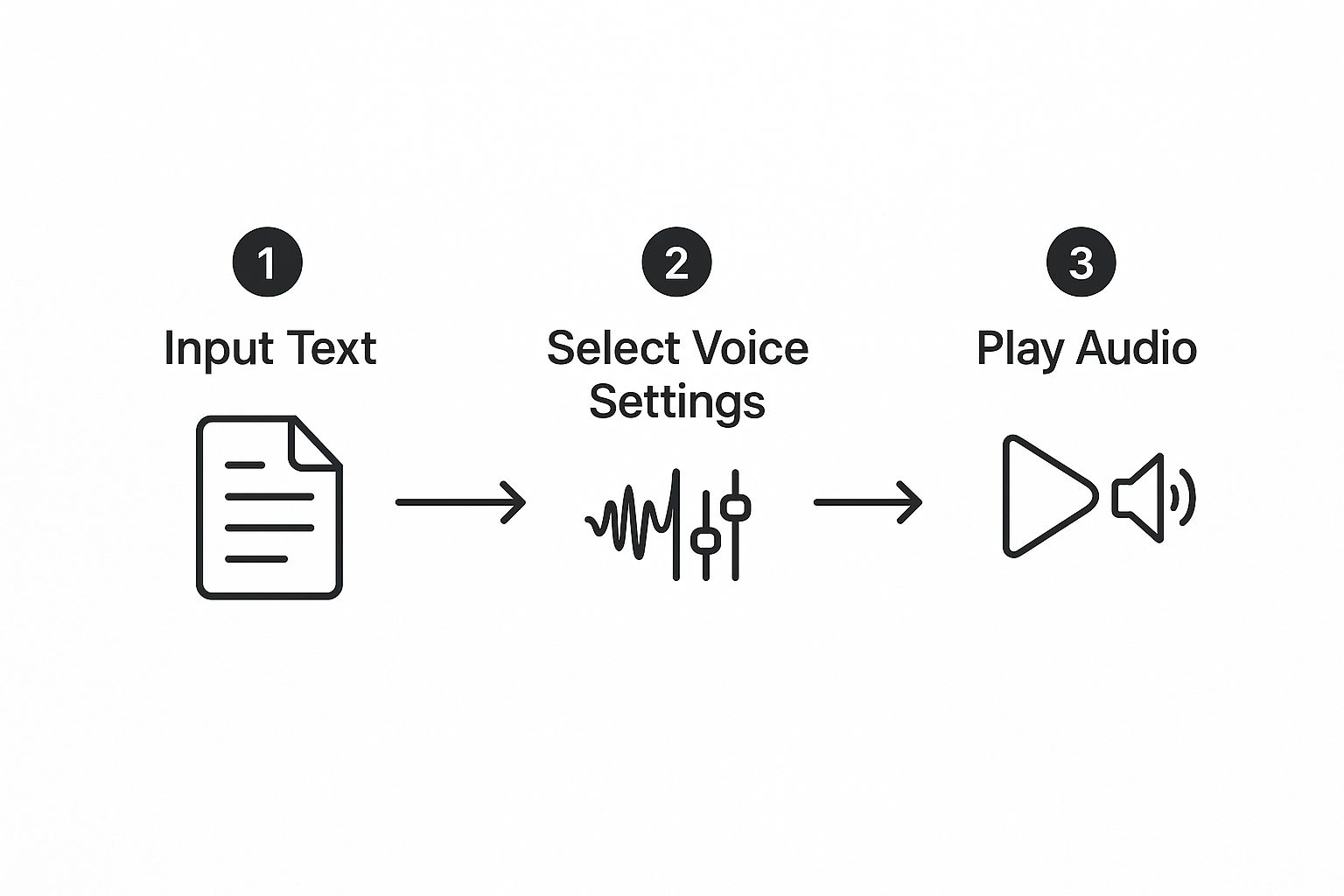
This process—input text, pick your settings, and hit play—is what makes these tools so powerful. The demand for this kind of simplicity is exploding. The global Text to Speech AI market was valued at USD 5.03 billion in 2024 and is expected to balloon to USD 13.08 billion by 2032.
Getting Websites into Your Ears
Bringing web content into an app like Speak4Me is surprisingly easy. The most straightforward approach is the good old copy-and-paste. Just find an article you want to hear, highlight the text on the page, and drop it right into the app. Instant audio.
But there's an even smoother way if you're on an iPhone.
I personally love using the built-in iOS Share Sheet. Instead of fussing with copying and pasting, you can send an entire webpage from Safari straight to Speak4Me with just a couple of taps. It completely removes the friction of switching between apps and is perfect for when I'm on the go.
Take any text-heavy site, like this one, and you can instantly convert it into an audio experience. It's a game-changer for multitasking and giving your eyes a much-needed break.
Both methods build a seamless bridge from written content to spoken word. If you want a more detailed walkthrough, you can find more tips on how to read a website aloud.
Whether you're catching up on current events or diving deep into a new hobby, these tools slide right into your daily routine. They turn those previously unproductive moments—like waiting in line or doing chores—into valuable listening time.
Turning Your Documents into Audio
Let's be real—your reading list is more than just web articles. It's a mountain of PDFs, work reports, study guides, and maybe even a few physical books you've been meaning to get to. While having an app that can read text online out loud is great for browsing, its true magic is in turning all that other stuff into audio.
This is where you can really start clawing back some time. Imagine a student listening to lecture notes while walking to class, or a lawyer reviewing a dense contract during their commute. The whole idea is to make all your content accessible, no matter where it lives.
From Cloud Storage to Your Ears
Most of us have our important files tucked away in the cloud. A good audio reader should play nice with these services, letting you pull in documents without a fuss. I've found that tools like Speak4Me, which connect directly to iCloud Drive and Google Drive, make this incredibly simple. A few taps, and you're good to go.
What kind of documents are we talking about?
PDFs and Reports: Turn that 50-page business proposal or academic paper into something you can listen to.
eBooks and Drafts: Listen to a chapter of a new book or get a fresh perspective on a manuscript you're writing by hearing it read aloud.
Meeting Notes: Catch up on what was decided in yesterday's meeting while you make your morning coffee.
If you want to get into the nitty-gritty, we have a complete guide that shows you exactly how to convert your PDFs into audio. It’s a simple feature, but it’s a game-changer for getting through a backlog.
Turn Physical Pages into Spoken Words
But what about the paper cluttering your desk? Memos, printed handouts, even pages from a physical book can be brought into the fold. This is where the camera on your phone becomes a surprisingly powerful tool. You can just scan a document, and the app will read it right back to you.
I find this scanning feature incredibly practical. It's like having a personal assistant who can read anything printed—from a client letter to a recipe card. You just snap a picture, and the app's tech pulls the text out for you.
This kind of text-to-speech capability isn't just for personal productivity, either. It’s a cornerstone for content creators. Many use it to generate voiceovers for their videos and even create a faceless YouTube channel with AI, turning a simple script into professional-sounding narration.
Whether your text is on a screen or on a piece of paper, you can turn it into an audio experience. To get started, you can download Speak4Me free on iOS and unlock a much more flexible way to get through your reading.
Finding Your Perfect Listening Voice
Let's be honest, nobody wants to listen to a robotic, monotone voice drone on for an hour. When you want to read text online out loud, the quality of the voice makes all the difference. It's what separates a genuinely useful tool from one you'll never open again.
This is why spending a few moments personalizing the voice in an app like Speak4Me is so important. You’re setting yourself up for a listening session that’s actually comfortable and effective.

A little tweaking can dramatically cut down on "listening fatigue"—that feeling when you just tune out. It also helps the information sink in. I always recommend trying out a few different accents and genders to find a narrator that clicks with you.
Customizing Your Audio Experience
Finding the right voice isn't just a matter of taste; it directly impacts how well you understand the material. A clear, engaging voice can turn a complicated document into something much easier to process.
Here's what you can control in Speak4Me:
Voice Selection: Jump into the settings and sample the different voices. Finding one you genuinely enjoy listening to is the key to staying focused.
Speaking Rate: You can also adjust the playback speed. I usually speed it up to power through my morning newsletters but slow it right down when I’m digging into a dense research paper.
These small adjustments put you in the driver's seat. If you want a step-by-step guide, our tutorial on how to change voices in Speak4Me will walk you through it.
The goal is to make the experience feel less like a computer reading to you and more like a person sharing information. This personal touch is what transforms a simple tool into an indispensable part of your daily routine.
This drive for a more human experience is a huge reason voice tech has taken off, particularly with younger folks. In fact, 77% of smartphone users between 18 and 34 use voice recognition features regularly. It’s a clear sign that people prefer interacting with technology through audio.
Ultimately, finding a voice you like makes the whole process more enjoyable and, more importantly, more effective. Ready to find yours? Download Speak4Me free on iOS and take control of your audio experience.
Got Questions? Here's What You Should Know
Diving into any new tool, you're bound to have a few questions. From my experience helping people get started with audio readers, a few things come up time and time again.
A big one is language support. It’s a fair question—what good is an app if it can't handle the content you actually read? A solid app won't be limited to just U.S. English. For example, Speak4Me has a whole library of different voices and accents. This is great if you're trying to listen to an article from an international source or even practice a new language by hearing it spoken correctly.
Will It Eat Up My Data? What About Super Long Books?
Another common worry is data usage. We're all watching our data plans, right? The good news is that turning text into audio uses a tiny fraction of the data you'd use streaming a song or watching a video. Plus, Speak4Me processes the audio once and lets you save it for offline listening. Perfect for your commute or a long flight.
Then there's the "what if it's too long?" question. Can these apps really handle a massive PDF or an entire novel?
Absolutely. Modern audio readers like Speak4Me are built for the long haul. The whole point is to give you a smooth, uninterrupted listening experience, whether you're tackling a quick memo or a 500-page book.
So, you really don't have to worry about hitting a character limit or the app crashing on a big file. A dedicated app is designed to be a reliable reading partner for pretty much anything you throw at it.
Ready to see for yourself? Join the thousands of people who are listening more and straining their eyes less with Speak4Me. Download Speak4Me free on iOS and give it a try.
Try Speak4Me for Free
