Best Text to Speech Software for Android

Imagine your Android phone reading articles, reports, or textbooks out loud to you. You could be commuting, working out, or just making dinner—all while catching up on your reading. That’s the magic of text to speech software for android. This technology turns any written words on your screen into natural-sounding audio, opening up a whole new way to get things done.
Turn Your Android into a Personal Reader
Whether you're a student facing a mountain of required reading, a professional trying to stay on top of emails, or just someone who enjoys listening more than reading, a good TTS app can be a real game-changer. It fundamentally changes how you interact with information, transforming static text into dynamic audio you can listen to anywhere.
This guide will walk you through how to find the right text to speech software for your Android, what features actually matter, and how to fit this powerful tool into your daily routine. Once you see the benefits, you'll be able to absorb information faster and get some valuable time back.
The Growing Demand for Audio Content
The move toward listening to content isn't just a fleeting trend. It’s a major shift, and the numbers back it up. The global text-to-speech market was valued at an impressive USD 4.0 billion in 2024 and is expected to hit USD 7.6 billion by 2029. This boom is fueled by AI-powered smart devices and a growing need for more accessible learning tools. You can Discover more insights about the TTS market growth to see the full picture.
This incredible growth shows just how much we rely on tools that make our digital lives easier and more inclusive. For the millions of Android users out there, this means access to powerful software that boosts both productivity and accessibility.
By turning written material into spoken words, TTS software lets you multitask in a way that reading just can't match. You can "read" a book while driving or catch up on work documents at the gym, essentially doubling your productive time.
Key Advantages of Using TTS on Android
Using a dedicated TTS app gives you a lot more than your phone's basic built-in reader. These apps pack a punch with features designed for real-world use. For a deeper dive, check out our guide on how to use text-to-speech for Android phones.
Here's a quick look at the main advantages of using text to speech software in your daily routine.
Benefit | How It Helps You |
|---|---|
Enhanced Productivity | Listen to articles, emails, and reports while doing other things. Turn your commute or workout into a learning session. |
Improved Accessibility | TTS is a vital tool that supports people with visual impairments or reading differences like dyslexia, making the digital world open to all. |
Reduced Eye Strain | Give your eyes a much-needed break from the screen. Switch to listening mode for long articles or dense documents. |
Better Comprehension | Hearing text read aloud can actually help you focus and remember information, making it easier to grasp complex topics. |
The right app can completely change the way you consume information, making you more efficient and less tied to your screen.
Ready to experience a smarter way to get through your reading list? Download Speak4Me free on iOS and turn your device into a powerful personal reader today.
How Your Phone Learns to Talk
Ever wondered how your phone can read an article out loud so clearly? It’s not magic—it's a fascinating process called speech synthesis. Think of it like a tiny, talented voice actor living inside your device, ready to read any script you hand them on the spot.
It all starts when the text to speech software for android breaks down your text into its smallest phonetic building blocks, like individual sounds and syllables. From there, advanced AI gets to work, stitching those sounds back together. But it doesn't just jam them together; it analyzes the text to add the right rhythm, pitch, and intonation, creating a voice that sounds surprisingly human. This is a massive improvement over older TTS, which often sounded robotic because it couldn't grasp these nuances.
From Robotic to Realistic Voices
Early text-to-speech systems were pretty clunky. They essentially just strung together pre-recorded sounds, which is why the voices came out sounding so flat and unnatural. Today's apps are in a completely different league, thanks to complex neural networks that help the software understand the context of what it's reading.
Instead of just reading words, the technology interprets punctuation, identifies questions versus statements, and adjusts its tone accordingly. This contextual awareness is what separates a high-quality voice from a monotone digital assistant.
For example, the software knows to raise its pitch at the end of a question or to pause for a beat at a comma. This ability to mimic the natural flow of human speech is what makes listening to a modern TTS app so much more pleasant and engaging. You can learn more about how technology creates these natural-sounding text to speech voices and what goes on behind the scenes.
The Core Process of Speech Synthesis
To turn silent text into clear, audible words, the best TTS software follows a pretty sophisticated process. It's all about ensuring the final output is accurate, high-quality, and easy to understand.
This infographic breaks down a simple way to think about finding and customizing a TTS app that works for you.
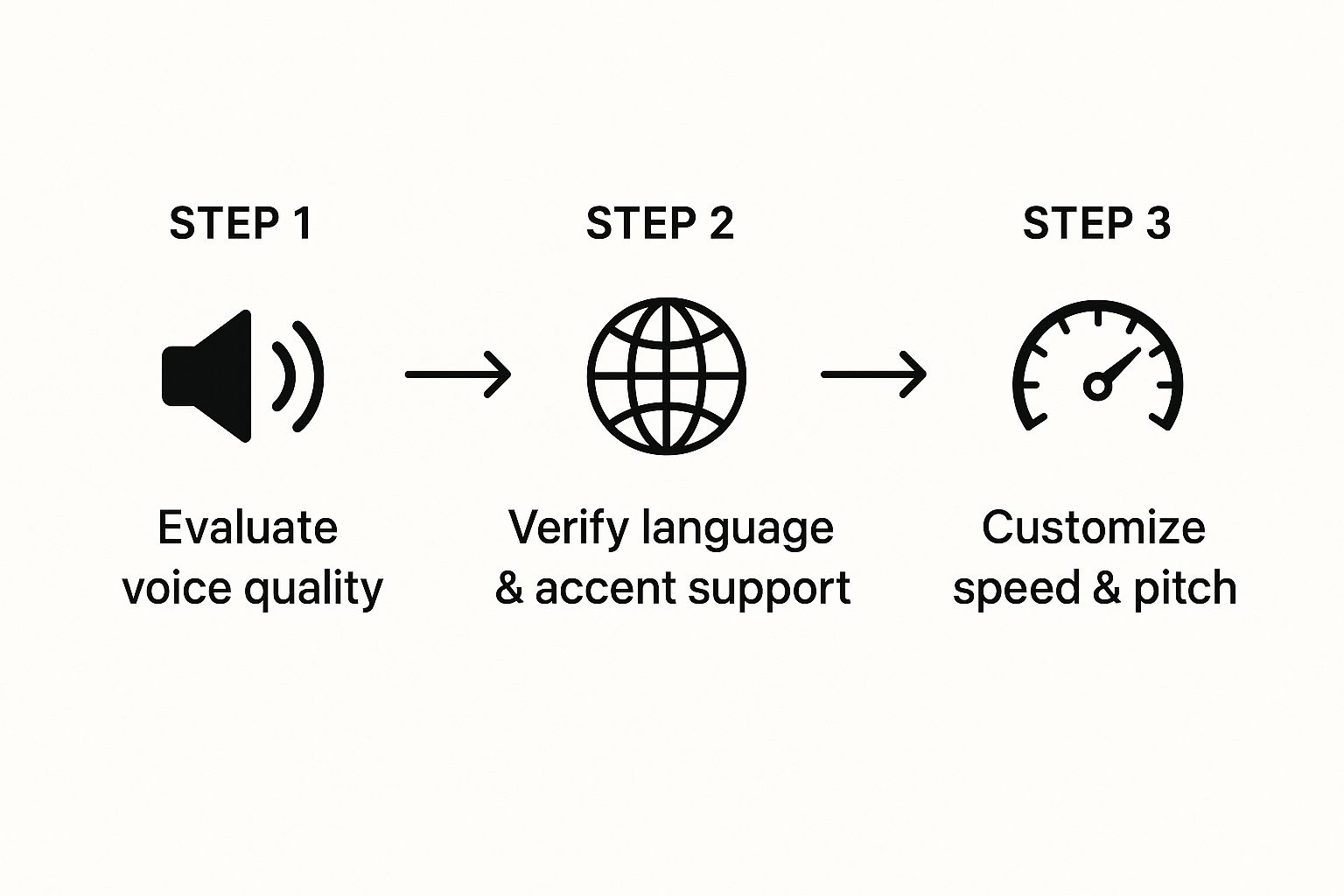
Ultimately, great text-to-speech comes down to a blend of high-quality voices, solid language support, and user control. By nailing these three things, the technology can deliver a listening experience that feels perfectly tuned to your needs. It’s this refined process that makes sure the voice is always clear and natural, whether you’re listening to a dense textbook chapter or a quick news update.
Ready to hear the difference for yourself? Download Speak4Me free on iOS and discover just how lifelike text-to-speech can be.
What to Look For in a Great TTS App
When you're searching for text to speech software for android, you’ll quickly realize they aren't all built the same. While they all turn words into audio, the experience is what separates the good from the great. Finding the right app means knowing which features actually matter for your day-to-day use.
The absolute number one factor? The quality of the voices. Let's be honest, a flat, robotic voice is grating. You can't listen to it for more than a few minutes, which completely defeats the purpose of using it for a long article or an entire book. The best apps use sophisticated AI to create voices that sound incredibly human and are genuinely pleasant to listen to.
But it’s not just about one good voice. Variety is key. Having different genders, accents, and even languages to choose from makes the whole experience feel more personal. You can pick a voice you actually connect with.
Taking Control of Your Listening
A good TTS app should put you in complete control. The most practical feature you'll use is adjustable playback speed. This simple dial lets you tailor the audio to whatever you're doing—slow it down to really absorb dense, technical material, or speed it up to breeze through familiar topics.
Without that control, you're stuck with a one-size-fits-all pace that rarely fits what you actually need.
Another huge deal is how the app handles different types of content. Your to-read list isn't just a bunch of web pages. A truly useful app needs to work with the formats you already use. Look for one that can easily import and read:
PDFs: Perfect for research papers, work reports, and e-books.
Web Articles: Let you send links straight from your browser to the app.
Documents: Should support common files like .docx and .txt.
Copied Text: Just copy text from anywhere and paste it in for a quick listen.
This kind of flexibility means the app fits into your life, not the other way around. It’s also worth checking for multi-language Text to Speech options, such as for Spanish, if you work with content in more than one language.
Essential vs. Advanced TTS Features
As you compare apps, it helps to know what’s a must-have versus a nice-to-have. This table can help you evaluate what to look for in text to speech software for android.
Feature | Why It Matters | Typical Availability |
|---|---|---|
High-Quality Voices | Makes listening enjoyable and reduces fatigue, which is crucial for long-form content. | Premium and top-tier free apps. |
Adjustable Speed | Gives you control over your learning pace, improving comprehension and efficiency. | Standard in most quality apps. |
File Import Options | Allows you to listen to content from various sources like PDFs, web pages, and documents. | Varies; more options in advanced apps. |
Text Highlighting | Syncs spoken words with on-screen text, which can aid focus and reading comprehension. | Often found in more feature-rich apps. |
By zeroing in on these key areas, you'll find a powerful tool that doesn't just read to you—it genuinely changes how you learn and get things done. Download Speak4Me free on iOS to start listening today.
How People Use Text to Speech Every Day
Text-to-speech isn't just a gimmick anymore. It’s a genuinely useful tool that people are weaving into their daily routines to make life easier, more productive, and frankly, more accessible. We've come a long way from those clunky, robotic voices of the past; today's TTS is a seamless part of how we learn, work, and consume digital content.
For a lot of people, text to speech software for android is a straight-up productivity hack. Think about all that "dead time" in your day—the commute, waiting in line, doing chores. TTS turns that time into a chance to catch up. Instead of mindlessly scrolling, you can listen to that long report from work, get through your email backlog, or finally tackle that article you saved weeks ago.
It's like having a personal reader in your pocket, ready whenever you are. This is a massive win for busy professionals who need to multitask. You can review documents while making dinner or listen to briefing notes while on a run. It's a simple, effective way to stay in the loop without having to stare at a screen.
Supporting Students and Learners
In education, TTS is nothing short of a lifesaver. Students are constantly buried under a mountain of reading—dense textbooks, long articles, and research papers. TTS software lightens that load by turning a reading slog into a listening session, which can actually boost focus and help the information stick.
The impact is even bigger for students with learning differences. For anyone who struggles with reading, TTS is a critical accessibility tool. It’s a leading form of assistive technology for dyslexia), for example, because it removes the struggle of decoding words on a page. This lets students focus on what really matters: understanding the material.
Ultimately, this technology helps create a more level playing field, giving every student a fair shot at success. Hearing the text read aloud makes it easier to follow along and pull out the important ideas.
A Powerful Tool for Writers and Creators
It’s not just for consuming content; it’s for creating it, too. Writers and creators are catching on to the power of hearing their own words read back to them. When you proofread on a screen, your brain has a sneaky habit of filling in the gaps and showing you what you meant to write, not what’s actually there.
When you listen to your text, you engage a different part of your brain. Awkward phrasing, clunky sentences, and typos that your eyes skimmed over become glaringly obvious when you hear them spoken.
This is an incredibly effective way to catch mistakes and smooth out the flow of your writing. It’s a pro-level trick for polishing your work before hitting publish.
Enhancing Accessibility for Everyone
Productivity and learning aside, the most important role of TTS is making the digital world accessible. For people with visual impairments, it’s a lifeline. It reads everything from text messages and websites to entire e-books, opening up a world of information that would otherwise be locked away.
It also assists individuals with physical disabilities that make it tough to hold a phone or turn the pages of a book. The same goes for seniors who might be dealing with age-related vision decline but still want to stay connected.
This gets to the heart of what makes TTS so valuable: it makes information universal. By turning written words into spoken audio, it breaks down barriers and empowers people to engage with the world on their own terms.
So, How Do You Get Started with a Great TTS App?
You’ll find a ton of text to speech software for android on the market, but let's be honest—finding one that’s both high-quality and easy to use is the real trick. Plenty of apps give you the bare minimum, but a genuinely powerful tool should feel like second nature the first time you open it. The whole point is to spend less time fumbling with controls and more time actually listening and learning.
If you’re after a smooth, high-quality listening experience, Speak4Me was built from the ground up to deliver exactly that on iOS. It’s all about exceptionally clear, natural-sounding voices that make marathon listening sessions a pleasure, not a chore. The interface is designed to get you up and running in seconds.
Making Listening Effortless
A top-notch TTS app needs to fit into your life, not the other way around. With Speak4Me, you can pull in text, articles, and important documents with no fuss. The real game-changer is being able to organize everything into custom playlists. Imagine lining up your entire day's reading—class notes, work reports, and those articles you saved—all ready to go.
That level of organization turns the app from a simple reader into your own personal content library. For a deeper dive into the fundamentals, you can learn more about what text-to-speech is and how to use it in our detailed guide.
You’re in the driver's seat. With adjustable reading speeds and a clean design, Speak4Me gives you total control. Slow things down for tricky subjects to let the information sink in, or crank up the speed to breeze through material you already know.
Built to Boost Your Productivity
The right app should support your goals, not add to your to-do list. Whether you're a student buried under a mountain of reading or a professional trying to stay current, a solid TTS tool can give you back precious hours in your day.
The explosion in voice-enabled apps shows just how much we’re shifting to listening. Just look at the voice-to-text market on mobile, a close cousin of TTS. In 2025, that market is expected to be worth USD 22.2 billion globally, and it’s projected to skyrocket to an incredible USD 183.5 billion by 2035. This massive growth, fueled by AI and our reliance on smartphones, makes one thing clear: people want high-quality voice tools.
This trend really hits on a core benefit of TTS: it’s the ultimate multitasking tool. You can absorb information while you’re commuting, at the gym, or doing chores around the house. Suddenly, all that downtime becomes productive learning time.
By weaving a powerful listening tool into your daily routine, you can get through so much more material without tacking extra hours onto your day. It’s all about working smarter. Your path to being more productive is literally just a tap away.
Got Questions About Android TTS? We've Got Answers.
Jumping into the world of text-to-speech software for Android can definitely bring up a few questions. You might be wondering what your phone can already do on its own, or how these apps even work their magic. Getting some straight answers is the best way to start using this technology to its full potential. Let's tackle some of the most common questions.
Does My Android Phone Already Have Text-to-Speech?
Yes, it almost certainly does. Pretty much every modern Android phone includes a built-in text-to-speech feature. You'll usually find it tucked away in the accessibility settings, often called "Select to Speak," and it does a basic job of reading on-screen text out loud. It's a decent tool for a quick, simple task.
But here's the thing: that built-in option is functional, but not fantastic. Dedicated TTS apps offer a completely different level of quality, with voices that sound far more natural and are genuinely pleasant to listen to for more than a few minutes. They also give you a ton more control over your content and listening experience.
Can These Apps Read From Anywhere On My Phone?
A good text-to-speech app is all about flexibility. The best ones are designed to pull in text from just about anywhere, which is what makes them so useful in day-to-day life.
For example, you can usually:
Copy and paste text straight into the app for a quick read.
Share a web article right from your browser to have it read to you.
Upload documents like PDFs, ebooks, or Word files from your phone or a cloud service.
This means you can turn almost any text into audio, whether it’s a short email you need to hear on the go or a dense report you'd rather listen to than read.
The real game-changer is an app that fits right into how you already work and read. Being able to pull content from different sources without a bunch of extra steps is what separates a decent app from an indispensable one.
Do Text-to-Speech Apps Burn Through My Mobile Data?
That’s a fair question, and it really depends on the app. Some TTS apps do all the heavy lifting in the cloud, which means they need an internet connection to work and will use some of your data. The trade-off is that this often gives you access to the most sophisticated and realistic-sounding voices available.
However, the best apps have a smart solution: offline voices. You simply download your favorite voices to your phone one time. After that, the app can convert text to speech right on your device, no internet needed. This is a must-have feature if you plan on listening during your commute, on a flight, or anywhere with spotty service, without ever worrying about your data plan. It’s all about having the freedom to listen whenever and wherever you want.
Ready to change the way you read? Speak4Me delivers a smooth, high-quality listening experience that just works. Download Speak4Me free on iOS and give your eyes a rest.
Try Speak4Me for Free
