Natural Text to Voice Indian Accent Guide
Getting a natural-sounding text to voice Indian accent is surprisingly simple when you have a tool that truly understands the local nuances. A quality app can take your written words and instantly turn them into authentic audio that’s perfect for anything from a personal project to a professional voiceover. Ready to get started? Download Speak4Me free on iOS.
Why an Authentic Indian Accent Matters
Ever listen to an automated voice that just sounds… wrong? That generic, robotic tone can really create a disconnect, making your message feel cold and distant. This is especially true when you're trying to reach an audience that's used to the specific rhythms and cadences of Indian English.
An authentic accent isn't just a nice-to-have feature; it's a bridge. It builds an immediate sense of trust and familiarity, making your content far more relatable. Think about an e-learning module for students in Mumbai or a customer service greeting for a local business. The goal is to sound human and local, not like a machine just reading a script.
The Growing Demand for Localized Voices
This move toward authentic voices is a clear trend. The global Text-to-Speech (TTS) market is on a steep climb, expected to jump from USD 3.87 billion in 2025 to a massive USD 7.28 billion by 2030. As India's digital presence grows, tools that offer a genuine text to voice Indian accent are becoming essential for connecting with users.
The numbers speak for themselves, showing a steady rise in the adoption of Indian-accented TTS over the past few years.
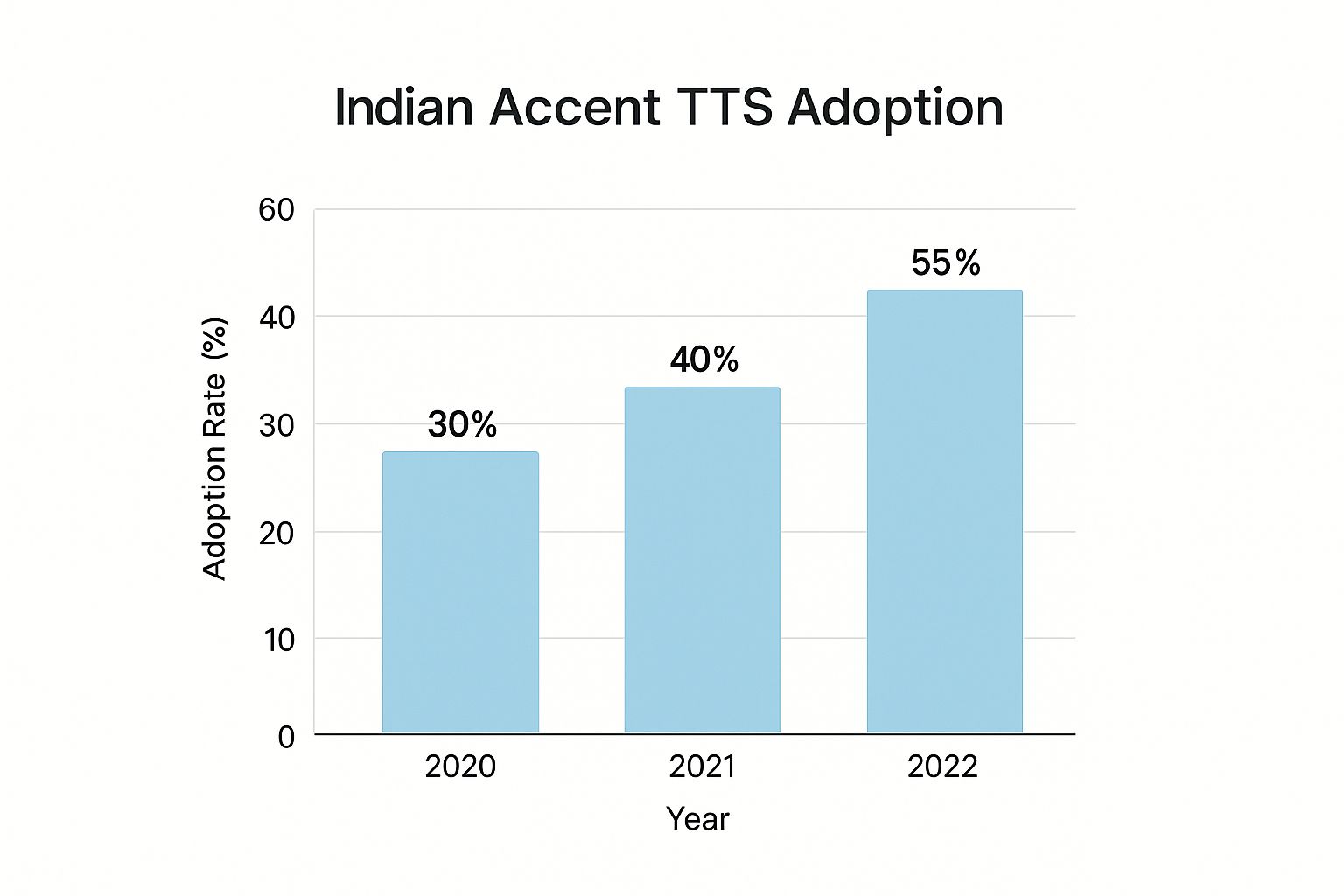
Alt text: Speak4Me – Chart showing the rising adoption of Indian-accented text-to-speech from 2021 to 2024.
This consistent increase shows a real hunger in the market for TTS solutions that are more culturally tuned in and sound genuinely natural.
The right accent transforms content from being merely heard to being truly understood and felt. It’s the difference between broadcasting a message and having a conversation.
To see just how much of a difference the right accent makes, consider these common scenarios:
Impact of Accent Authenticity in TTS
Application | Generic Accent TTS | Authentic Indian Accent TTS |
|---|---|---|
E-Learning | Students may find it hard to relate, leading to lower engagement. | Improves comprehension and makes learning feel more familiar and accessible. |
Customer Support | Can sound impersonal and frustrating, leading to a poor customer experience. | Builds instant rapport and trust, making callers feel understood and valued. |
Content Creation | YouTube videos or podcasts may struggle to connect with a local audience. | Creates a more authentic connection, boosting viewer and listener loyalty. |
Accessibility | Works, but lacks the warmth and familiarity that aids understanding. | Makes digital content more inclusive and comfortable for visually impaired users. |
As you can see, choosing an authentic accent isn't a small detail—it has a direct impact on how well your message is received.
Getting this level of quality means using a tool built to capture all the subtle details of language. If you're curious to learn more, check out our guide on what makes for natural-sounding text to speech.
Ready to create your own authentic audio? Download Speak4Me free on iOS and start turning your text into a voice that truly connects with your audience.
Getting Your Feet Wet with Speak4Me
Jumping into a new app can sometimes feel like a chore, but you'll find that creating your first audio clip with Speak4Me is incredibly straightforward. The whole experience is designed to get you from text to a natural-sounding Indian accent voice in just a few taps. No complicated menus, no digging through settings.
The main screen is basically a blank slate, inviting you to type or paste your text right away. It’s a simple, no-fuss approach that lets you concentrate on what you want to say, not on figuring out the tool.
Finding and Picking the Indian Voice
First things first, let's choose the voice. On the main screen, you’ll see the voice selection menu—it’s hard to miss. Tapping it opens up a whole library of high-quality voices.
Just scroll down until you spot the "English (India)" option. Speak4Me gives you a few distinct choices here, so you can find the perfect tone for whatever you're creating, whether it's a polished business presentation or a quick voiceover for a social media video.
Here’s a peek at what you’ll see the moment you open the app. Clean, simple, and ready to go.
Alt text: Speak4Me – Screenshot of the Speak4Me app interface showing the text input field and voice selection menu.
As you can see, the layout makes it obvious where to put your text and how to get to the voice library. It’s all about speed.
Once you’ve tapped the Indian English voice, you’re good to go. Try typing something into the box—maybe a simple phrase like, "Welcome, we're happy to assist you today"—and hit the play button. You'll instantly hear it spoken in a clear, authentic Indian accent.
It really is that fast. The whole idea is to let you go from a thought to a finished audio clip in less than a minute.
If you want to play around with different phrases and see how the voice handles certain words before downloading the app, you can give it a quick test run on the Speak4Me web platform.
Ready to give it a shot? Download Speak4Me free on iOS and start creating your own audio right now.
Writing Text That Sounds Truly Human
The secret to getting a great text to voice Indian accent isn't just in the tech—it's in the text you give it. The words you write are the foundation, and a few simple tweaks to your script can be the difference between a robotic voice and one that sounds genuinely human.
Think about how you speak. You naturally pause and change your rhythm. You can guide the AI to do the same thing using punctuation. A comma, for example, signals a small breath. For bigger ideas, don't be afraid to use shorter sentences. This stops the AI from sounding rushed and creates a much more natural, conversational pace.

Alt text: Speak4Me – An example of a well-formatted script with punctuation to guide the text-to-voice Indian accent output.
When you write this way, you're helping the AI understand what you're trying to say. This is all thanks to the incredible power of Natural Language Processing (NLP), which is how these tools learn to interpret context and intent.
Tips for Realistic Indian English
Getting those common Indian English phrases and tricky words right is where the magic really happens. It's less about just typing and more about thinking how things are actually said out loud.
Spell it like it sounds: If the AI stumbles over a name or a specific term, try spelling it phonetically. Writing "Dee-paak" instead of "Deepak," for instance, can make all the difference.
Use pauses for effect: Want to create a more thoughtful or dramatic moment? An ellipsis (...) is your best friend. It’s far more effective than just adding extra spaces.
Write like you talk: Unless you're creating a formal announcement, use contractions like "it's" or "you're." This instantly makes the tone more relaxed and approachable.
Think of it this way: you're not just feeding text into a machine. You're directing a performance. Smart formatting puts you in the collaborator's seat, shaping the final audio.
Ready to hear your own words come to life? Download Speak4Me free on iOS and transform your writing into a voice that connects.
Real-World Uses for Indian Accent Audio
So, you've got the technical side down. But what can you actually do with a text to voice Indian accent? This is where the fun begins, moving from features on a screen to real-world solutions that can make a genuine difference.
Think about it from the perspective of a small business owner in Delhi. Instead of a generic, robotic phone greeting, they could use Speak4Me to create a warm, welcoming IVR message in an accent that feels instantly familiar. That small change makes the business feel local, personal, and much more approachable.

Alt text: Speak4Me – Illustration showing various applications of Indian accent text to voice, from business to education.
From Education to Entertainment
The potential goes way beyond just business greetings. People get incredibly creative with this kind of tool.
Here are a few scenarios where a quality Indian accent voice really shines:
Content Creation: Imagine a vlogger making a video about Indian street food. Adding a narration in a natural Indian accent just fits perfectly. It makes the whole video feel more authentic and connects better with the audience.
E-Learning: A student cramming for exams can turn their dense study notes into audio files. Suddenly, they can revise on the bus or while at the gym, listening to complex topics explained in a clear, easy-to-follow voice.
Accessibility: Developers can use these voices to build apps that read digital content aloud for visually impaired users. This isn't just a "nice-to-have" feature; it supports making information accessible to everyone.
This isn't a niche thing, either. Text-to-Speech is exploding in the Asia Pacific region, showing the highest growth rate in the world. Why? Because there's a huge demand for voice tech that can handle the unique sounds and rhythms of languages like Indian English.
These aren't just abstract features on a list. They're practical tools that help you communicate more effectively and connect with your audience on a much deeper level.
Once your Indian accent audio is generated, knowing how to create an audio file is the next logical step to putting it to use. Each of these examples shows how a tool like Speak4Me solves a real problem, giving you the power to create professional-sounding audio without any hassle.
Ready to try it for yourself? Download Speak4Me free on iOS and see what you can bring to life.
Here's how to take your audio from good to great. Once you've got the hang of the basics in Speak4Me, it's time to dive into the settings that give your text to voice Indian accent audio a truly professional polish.
Think of yourself as a voice director. You're not just creating audio; you're shaping its performance to fit your exact needs.
Adjusting Speed and Tone
One of the most powerful tools at your disposal is the speech rate. Need to create a sense of urgency for a last-minute announcement? Speed it up. Crafting a clear, patient tutorial? Slow it down. This one adjustment can completely change how your message lands with the listener.
But it doesn't stop there. You can also play with the pitch to dial in the right emotion. A slightly higher pitch can bring a feeling of excitement or energy, while a lower pitch often sounds more authoritative or serious. The real magic happens when you match the pitch and speed to the emotional core of your words, making the voice feel genuinely human.
While North America has traditionally dominated the Text-to-Speech market with over 37% market share, the game is changing fast. The demand for authentic Indian accents is surging, thanks to globalizing businesses and India’s booming IT and customer service industries. These sectors need voice tools that connect with audiences worldwide, which is exactly where this technology shines. You can learn more about these market trends and their impact on voice technology.
A Great Time-Saving Trick: Save your most-used phrases—like social media intros or common replies—right inside Speak4Me. It's an absolute game-changer for anyone creating regular content or using the app for daily communication.
By spending just a little time experimenting with these settings, you can elevate your audio to a whole new level. It’s these subtle tweaks that make all the difference, ensuring a polished, professional result every single time.
Ready to take control? Download Speak4Me free on iOS and start crafting your perfect voice.
Got Questions About Indian Accent TTS?
When you first start exploring Indian-accented text-to-speech, it's natural to have a few questions. Let's walk through some of the most common ones to help you get the best results right away.
Can I Make the Voice Faster or Slower?
Yes, you can! This is one of the most practical features in Speak4Me. You have full control over the speech rate, so you can speed things up or slow them down as needed.
This comes in handy all the time. For example, you might want a quick, punchy delivery for a social media clip, but a slower, more thoughtful pace for an educational video. It's all easily adjustable.
Are There Different Male and Female Voice Options?
Absolutely. Speak4Me comes with a great selection of high-quality male and female voices in an Indian English accent.
The best way to choose is to jump into the app's voice library and listen to the samples. This helps you find the perfect voice that matches the personality and tone you're going for in your project.
What if the AI Messes Up a Word's Pronunciation?
This is a great question, especially when dealing with unique names, industry-specific terms, or local places. The secret is to spell the word out phonetically.
For instance, if the AI is saying a name like "Karan" incorrectly, you could try typing it as "Kuh-raan" instead. It might take a bit of trial and error, but you’ll be surprised at how much control this gives you over the final sound.
Pro Tip: Spend a few minutes playing with phonetic spellings for a word you're struggling with. Once you see how the AI interprets different letter combinations, you'll get a feel for it and be able to fix pronunciations quickly.
Can I Save Phrases I Use All the Time?
Of course. To make your workflow faster, Speak4Me lets you save and organize your frequently used text snippets.
This is a massive time-saver. Whether you're saving common business announcements, standard social media replies, or personal communication aids, you can access them with just a tap instead of typing them out every single time.
Ready to try these features out for yourself? With Speak4Me, you have everything you need to create clear, natural-sounding audio with an authentic Indian accent.
Try Speak4Me for Free
